
We’ve all been there: you open an app on a train, in a concrete building, or in a remote area, and all you get is an endless loading spinner. Frustrating, right?
---
The Core Concept: The Repository Pattern
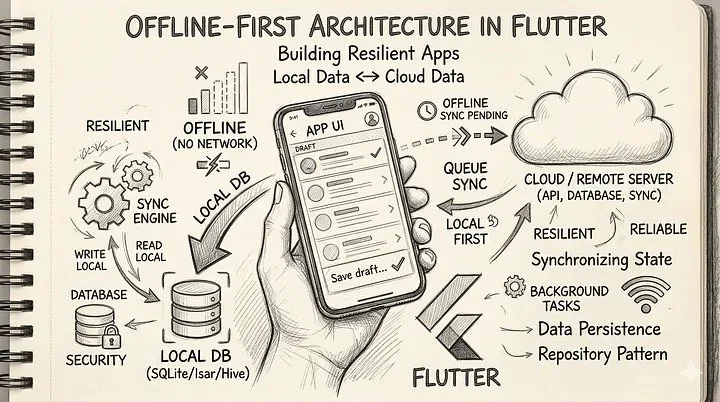
At the heart of Flutter’s offline-first architecture is the Repository Pattern. Repositories act as the single source of truth for your UI.
Instead of your UI talking directly to an API, it talks to a Repository. The Repository acts as a middleman, orchestrating two separate services:
1. ApiClientService: Handles remote HTTP REST calls to your backend.
2. DatabaseService: Manages local data persistence (using tools like Isar, Drift, or Hive).
By keeping these separated, your UI simply asks the Repository for data, completely unaware of whether it came from a local cache or a remote server.
---
Strategy 1: Reading Data
When it comes to reading data, your goal is speed and reliability. Depending on how crucial up-to-date data is for your app, you have three main approaches:
Approach A: Local Data as a Fallback
In this model, your app tries to fetch fresh data from the API first. If the request succeeds, it updates the local database and returns the data. If the network call fails (e.g., the device is offline), the app catches the error and serves the locally cached data.
Approach B: Using a Stream (The Best of Both Worlds)
This is the gold standard for responsive UIs. The Repository returns a Stream that emits multiple values. First, it immediately yields the locally stored data. Because reading from a local database is blazing fast, the UI populates instantly. Meanwhile, a network call is made in the background. Once the fresh remote data arrives, the database is updated, and the Stream emits the new value, seamlessly updating the UI.
Approach C: Using Only Local Data
In this highly decoupled approach, the UI only _ever_ reads from the local database. A completely separate sync() method is triggered (either manually via a pull-to-refresh, or automatically via a background timer) to fetch remote data and update the local database.
---
Strategy 2: Writing Data
Writing data introduces a new challenge: what happens when the user makes a change while offline? You have two primary paths here:
Approach A: Online-Only Writing
In this strict approach, the app attempts to push the data to the API service first. _Only_ if the API call is successful does the app save the data to the local database.
Approach B: Offline-First Writing
This is the true offline-first experience. When a user creates a new record, write it immediately to the local database and flag it as “unsynced”. The UI reacts instantly. Afterward, a sync engine attempts to push the change to the API.
class EntryRepository {
  final DatabaseService _localDb;
  final ApiClientService _remoteApi;

  Future<void> createEntry(Entry entry) async {
    // 1. Mark as unsynced
    final newEntry = entry.copyWith(isSynced: false);

    // 2. Save locally (UI updates instantly)
    await _localDb.saveEntry(newEntry);

    // 3. Attempt to sync to the remote server
    _syncWithServer(newEntry);
  }

  Future<void> _syncWithServer(Entry entry) async {
    try {
      await _remoteApi.postEntry(entry);
      // On success, update the local flag
      await _localDb.updateEntry(entry.copyWith(isSynced: true));
    } catch (e) {
      // Network failed. Do nothing. The background sync will catch it later.
      print('Network unavailable, will sync later.');
    }
  }
}
If you choose this route, you will need a Background Sync Engine. Using a package like connectivity_plus, you can listen for when the network is restored and push any pending items:
Connectivity().onConnectivityChanged.listen((ConnectivityResult result) {
  if (result == ConnectivityResult.mobile || result == ConnectivityResult.wifi) {
     _pushUnsyncedData(); // Fetches all isSynced == false and pushes them
  }
});
---
Handling the Edge Cases
While the concepts are straightforward, the implementation can get tricky. You’ll need to consider:
workmanager can help you run background sync tasks even when the Flutter engine is paused.---
Conclusion
Transitioning to an offline-first mindset changes how you build apps. It isn’t a single rigid pattern, but a collection of strategies — from Streams to background sync engines — that you can tailor to your app’s specific needs. It requires more boilerplate up front, but the payoff is massive. You end up with an app that feels lightning-fast, highly resilient, and respects the user’s data regardless of their physical location.
Loading…