
If you’ve spent any time writing Flutter apps, you’ve almost certainly used Generics. Every time you declare a List<String> or a Future<int>, you are utilizing the power of Generic Types.
But consuming generics is one thing; creating your own generic classes and functions is where you truly level up your Dart architecture. Whether you are managing real-time data streams for a messaging platform, structuring local storage for a journaling app, or building robust enterprise tools, generics are the key to keeping your codebase clean, type-safe, and DRY (Don’t Repeat Yourself).
Let’s break down how to create, constrain, and master custom generics in your Flutter projects.
---
Table of Contents
---
What Are Generics?
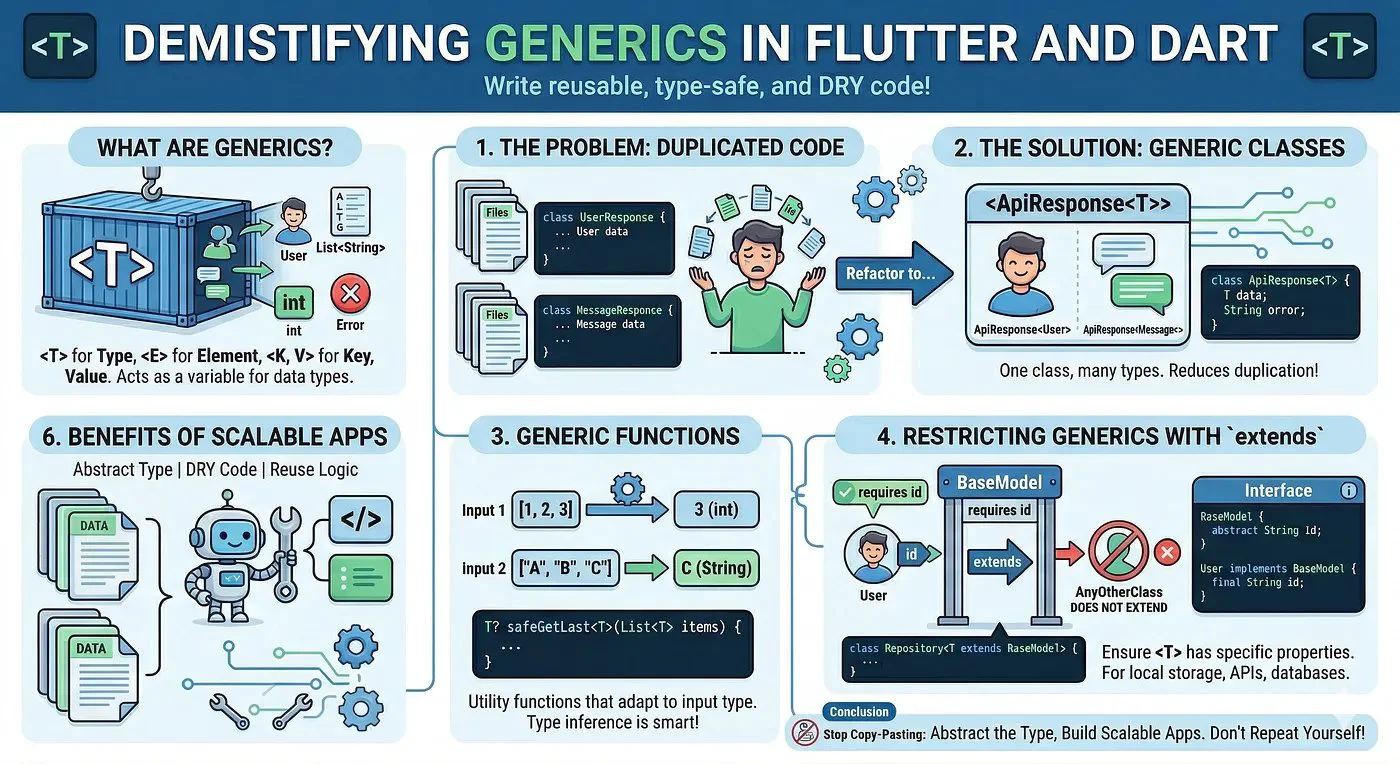
Generics allow you to write code that works with any data type while still maintaining strict type safety. In Dart, generic types are conventionally represented by a single uppercase letter:
<T> for Type<E> for Element<K, V> for Key and ValueInstead of writing a class that only works with a String or an int, you write a class that works with <T>. The actual type is "plugged in" later when you instantiate the class.
---
The Problem: Duplicated Code
Imagine you are fetching data from an API. You need to handle success and error states for various models. Without generics, you might write repetitive wrappers like this:
class UserResponse {
  final User? data;
  final String? error;
  UserResponse(this.data, this.error);
}

class MessageResponse {
  final Message? data;
  final String? error;
  MessageResponse(this.data, this.error);
}
This gets tedious quickly. Every time you add a new model, you have to create a new response wrapper.
---
The Solution: Generic Classes
Let’s refactor that using a Generic Type. We can create a single ApiResponse class that adapts to whatever model we throw at it.
class ApiResponse<T> {
  final T? data;
  final String? error;

  ApiResponse({this.data, this.error});

  bool get isSuccess => data != null;
}
Now, your code becomes incredibly reusable:
// Usage
final userResult = ApiResponse<User>(data: currentUser);
final messagesResult = ApiResponse<List<Message>>(data: chatHistory);

print(userResult.isSuccess); // true
---
Generic Functions
You aren’t limited to classes; you can apply generics directly to functions. This is useful for utility functions that perform operations on collections.
Here is a simple function that takes a list of any type and returns the last item safely:
T? safeGetLast<T>(List<T> items) {
  if (items.isEmpty) return null;
  return items.last;
}

void main() {
  final numbers = [1, 2, 3];
  final strings = ['A', 'B', 'C'];

  // Dart's type inference is smart enough to figure out the type
  print(safeGetLast(numbers)); // Outputs: 3
  print(safeGetLast(strings)); // Outputs: C
}
---
Restricting Generics with extends
Sometimes, total freedom isn’t what you want. You might need your generic type <T> to have certain properties. You can constrain a generic type using the extends keyword.
Let’s say you’re building a generic repository. You want to ensure that any object passed to this repository has an id.
First, define a base interface:
abstract class BaseModel {
  String get id;
}

class User implements BaseModel {
  @override
  final String id;
  final String name;
  User(this.id, this.name);
}
Next, constrain your generic repository:
class LocalRepository<T extends BaseModel> {
  final Map<String, T> _storage = {};

  void save(T item) {
    // Because T extends BaseModel, Dart knows 'item' has an 'id'
    _storage[item.id] = item;
    print('Saved item with ID: ${item.id}');
  }

  T? getById(String id) => _storage[id];
}
If you try to pass a type that doesn’t implement BaseModel (like a standard String), the Dart compiler will throw an error, preventing runtime crashes.
---
Key Takeaways
List<int> vs List).ApiResponse<T>).<T extends BaseModel>.Conclusion
Generics might look intimidating at first, but they are a fundamental tool for writing scalable Flutter applications. By abstracting the "Type" away from your logic, you can build powerful, reusable services and UI components.
Next time you find yourself copying and pasting a class just to change a variable type, ask yourself: Could this be a Generic?
---
Happy coding! 🚀
Loading…