
Nếu bạn đã từng share một bài nhạc Spotify hay một listing Airbnb vào iMessage và thấy một preview card đẹp hiện ra — rồi tap vào và được đưa thẳng vào đúng màn hình trong app — thì đó chính xác là trải nghiệm chúng ta sẽ xây dựng hôm nay.
Trước đây việc này chỉ cần một package duy nhất là Firebase Dynamic Links. FDL đã bị shut down vào ngày 25 tháng 8 năm 2025, nên giờ chúng ta phải tự làm. Tin vui là: không khó như bạn nghĩ, bạn có toàn quyền kiểm soát preview, và không phải trả tiền vendor cho thứ về bản chất chỉ là một static file và 40 dòng HTML.
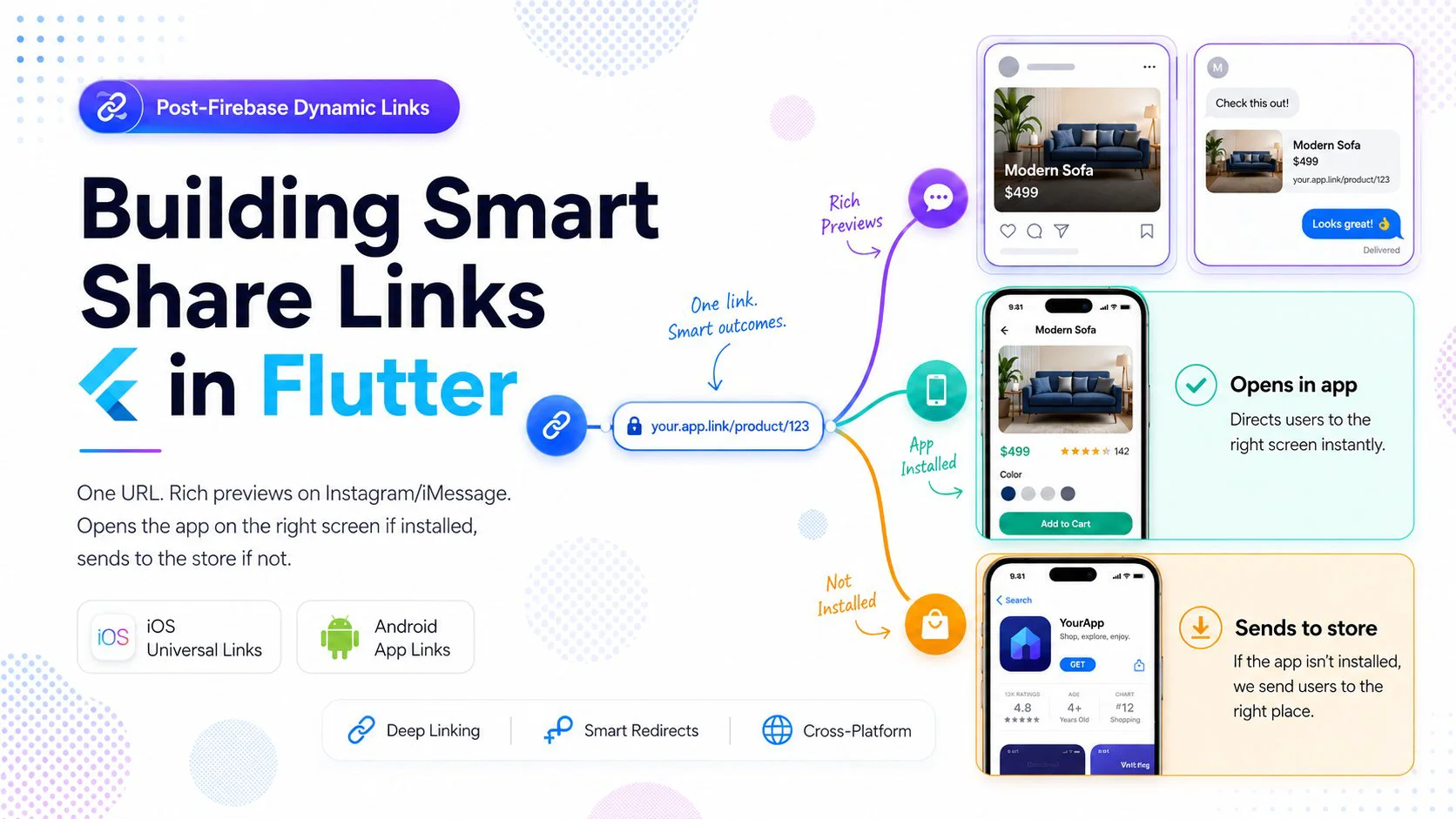
Những gì chúng ta sẽ cover:
1. Kiến trúc tổng thể (đơn giản hơn bạn tưởng)
2. Landing page — OG meta tags + smart redirect
3. Cài đặt iOS Universal Links
4. Cài đặt Android App Links
5. Xử lý link trong Flutter với app_links
6. Deferred deep links (giữ nguyên đích đến qua quá trình cài đặt)
7. Share từ trong app
8. Testing & các lỗi hay gặp
---
1. Kiến Trúc Tổng Thể
Một "share link" thực chất là một URL duy nhất đảm nhiệm ba vai trò tùy theo ngữ cảnh:
                    https://yourapp.com/p/abc123
                              │
                              ▼
              ┌───────────────────────────────┐
              │   What's reading this URL?    │
              └───────────────────────────────┘
                              │
        ┌─────────────────────┼─────────────────────┐
        ▼                     ▼                     ▼
  Social crawler        Phone w/ app          Phone w/o app
  (FB, IG, iMessage,    installed             installed
   Slack, Twitter)            │                     │
        │                     ▼                     ▼
        ▼              OS intercepts the      Browser loads
  Reads <meta> tags    URL before browser     landing page
  Builds preview       opens, hands it        → JS sniffs UA
  card with image,     directly to app        → Redirects to
  title, description   → app routes to        App Store /
                       correct screen         Play Store
Điểm mấu chốt: cùng một URL vừa là webpage vừa là deep link. OS sẽ quyết định cái nào thắng dựa trên việc app đã được cài và đã được verify cho domain đó chưa. Webpage chỉ chạy khi không có app nào intercept — vì vậy nó hoàn toàn có thể là một smart redirector.
Chúng ta cần ba thứ trên server:
https://yourapp.com/p/<id> — một dynamic landing page với OG tags + smart redirecthttps://yourapp.com/.well-known/apple-app-site-association — iOS verificationhttps://yourapp.com/.well-known/assetlinks.json — Android verificationVà hai thứ trong Flutter app:
app_links để nhận URL và route đến đúng màn hìnhBắt đầu thôi.
---
2. Landing Page (OG Meta + Smart Redirect)
Đây là trang mà các crawler scrape để tạo preview, và cũng là trang người dùng chưa cài app sẽ thấy. Hãy generate nó server-side theo từng item được share để mỗi post có preview riêng.
Dưới đây là một handler Node/Express tối giản — bạn adapt sang stack của mình:
app.get('/p/:id', async (req, res) => {
  const post = await db.posts.findById(req.params.id);
  if (!post) return res.status(404).send('Not found');

  const title = escapeHtml(post.title);
  const description = escapeHtml(post.description);
  const image = post.imageUrl;        // must be absolute https URL, 1200x630 ideal
  const url = `https://yourapp.com/p/${post.id}`;

  res.set('Cache-Control', 'public, max-age=300');
  res.send(`<!DOCTYPE html>
<html lang="en">
<head>
  <meta charset="utf-8">
  <title>${title}</title>
  <meta name="description" content="${description}">

  <!-- Open Graph (Facebook, Instagram, iMessage, LinkedIn, Slack) -->
  <meta property="og:type" content="article">
  <meta property="og:url" content="${url}">
  <meta property="og:title" content="${title}">
  <meta property="og:description" content="${description}">
  <meta property="og:image" content="${image}">
  <meta property="og:image:width" content="1200">
  <meta property="og:image:height" content="630">
  <meta property="og:site_name" content="YourApp">

  <!-- Twitter / X -->
  <meta name="twitter:card" content="summary_large_image">
  <meta name="twitter:title" content="${title}">
  <meta name="twitter:description" content="${description}">
  <meta name="twitter:image" content="${image}">

  <!-- iOS Smart Banner fallback (still useful in Safari) -->
  <meta name="apple-itunes-app" content="app-id=1234567890, app-argument=${url}">

  <style>
    body { font-family: -apple-system, system-ui, sans-serif;
           max-width: 480px; margin: 40px auto; padding: 0 20px; text-align: center; }
    img.cover { width: 100%; border-radius: 12px; }
    .btn { display: inline-block; padding: 14px 28px; background: #111; color: #fff;
           border-radius: 999px; text-decoration: none; margin-top: 16px; }
  </style>
</head>
<body>
  <img class="cover" src="${image}" alt="">
  <h1>${title}</h1>
  <p>${description}</p>
  <a class="btn" id="openApp" href="${url}">Open in YourApp</a>

  <script>
    // Smart redirect: send mobile users to the store if the app didn't intercept.
    (function () {
      var ua = navigator.userAgent || '';
      var isIOS = /iPhone|iPad|iPod/i.test(ua);
      var isAndroid = /Android/i.test(ua);
      if (!isIOS && !isAndroid) return; // desktop / crawler: just show the page

      var APP_STORE  = 'https://apps.apple.com/app/id1234567890';
      var PLAY_STORE = 'https://play.google.com/store/apps/details?id=com.yourcompany.yourapp';

      // If the OS recognises this URL as a Universal/App Link, it will
      // intercept *before* this script runs. If we're still here after
      // a short delay, the app isn't installed → store.
      setTimeout(function () {
        if (document.hidden) return; // app opened, page backgrounded
        window.location.href = isIOS ? APP_STORE : PLAY_STORE;
      }, 1500);
    })();
  </script>
</body>
</html>`);
});
Một vài điều đáng lưu ý về trang này:
Ảnh quan trọng hơn chữ. Với Instagram, iMessage, và Twitter, preview về cơ bản chính là og:image. Dùng kích thước 1200×630, URL HTTPS tuyệt đối, dưới 5 MB, và không để sau auth. Nếu bạn có thể pre-render một ảnh composite có thương hiệu (tiêu đề + ảnh bìa trên nền đẹp), hãy làm — tỷ lệ click cao hơn nhiều so với ảnh raw do người dùng upload.
Crawler không chạy JavaScript. Facebook debugger, link unfurler của iMessage, Slack — tất cả đều đọc static HTML. Vì vậy các thẻ <meta> phải có trong response ban đầu, không phải inject phía client. Đây là lý do một single-page app tại /p/:id sẽ không generate được preview nếu không có SSR.
setTimeout redirect là heuristic, không phải guarantee. Khi một Universal Link hoặc App Link đã được verify đúng cách, OS hijack URL trước khi browser load — trang (và script) không bao giờ chạy. Nếu trang có chạy, đó là bằng chứng app chưa được cài — nên ta redirect về store. Check document.hidden để phòng trường hợp hiếm khi app mở chậm hơn dự kiến một chút.
Đừng quên nút "Open in App" hiển thị rõ ràng. Một số người dùng tap share link từ bên trong in-app webview (Instagram bio, Telegram preview) không trigger Universal Links. Nút này là lối thoát thủ công cho họ.
---
3. iOS Universal Links
Hai phần: một file JSON trên domain, và một capability trong Xcode.
apple-app-site-association
Host file này tại https://yourapp.com/.well-known/apple-app-site-association (không có extension .json, serve với Content-Type application/json, qua HTTPS, không redirect):
{
  "applinks": {
    "details": [
      {
        "appIDs": ["TEAMID.com.yourcompany.yourapp"],
        "components": [
          { "/": "/p/*", "comment": "matches share links" }
        ]
      }
    ]
  }
}
Tìm TEAMID trong Apple Developer → Membership. Mảng appIDs có thể chứa nhiều entry nếu bạn có nhiều flavor (staging, prod).
Xcode
Mở ios/Runner.xcworkspace → Runner target → Signing & Capabilities → + Capability → Associated Domains → thêm:
applinks:yourapp.com
Vậy là xong phần iOS. Lưu ý quan trọng: CDN của Apple cache file AASA rất aggressively. Lần fetch đầu tiên có thể mất đến 24 giờ, và simulator xử lý AASA khác với thiết bị thật — luôn test trên device vật lý trước khi kết luận là xong.
---
4. Android App Links
Cấu trúc tương tự, khác file.
assetlinks.json
Host tại https://yourapp.com/.well-known/assetlinks.json:
[{
  "relation": ["delegate_permission/common.handle_all_urls"],
  "target": {
    "namespace": "android_app",
    "package_name": "com.yourcompany.yourapp",
    "sha256_cert_fingerprints": [
      "14:6D:E9:83:C5:73:06:50:D8:EE:B9:95:2F:34:FC:64:16:A0:83:42:E6:1D:BE:A8:8A:04:96:B2:3F:CF:44:E5"
    ]
  }
}]
Nguyên nhân #1 của lỗi "chạy được trên debug, broken trên production" là dùng SHA-256 của debug keystore thay vì release keystore. Nếu bạn ship qua Play App Signing (hiện là default), lấy production SHA-256 từ Play Console → your app → Release → Setup → App Integrity → App signing. Thêm cả fingerprint debug và release vào mảng trong quá trình testing.
Để lấy debug fingerprint ở local:
cd android
./gradlew signingReport
AndroidManifest.xml
Thêm intent filter vào <activity> chính:
<intent-filter android:autoVerify="true">
    <action android:name="android.intent.action.VIEW" />
    <category android:name="android.intent.category.DEFAULT" />
    <category android:name="android.intent.category.BROWSABLE" />
    <data android:scheme="https"
          android:host="yourapp.com"
          android:pathPrefix="/p/" />
</intent-filter>
Thuộc tính android:autoVerify="true" khiến Android fetch assetlinks.json lúc cài đặt và bỏ qua dialog "Open with…" chọn ứng dụng. Không có nó, app của bạn chỉ xuất hiện như một trong nhiều lựa chọn — UX rất tệ.
Tắt default deep link handler của Flutter (nếu dùng app_links)
Nếu bạn đang dùng Flutter ≥ 3.27, framework đã có sẵn deep-link handler riêng sẽ xung đột với app_links. Tắt nó đi bằng cách thêm metadata này trong thẻ <activity>:
<meta-data android:name="flutter_deeplinking_enabled" android:value="false" />
---
5. Xử Lý Link Trong Flutter
Thêm package:
dependencies:
  app_links: ^6.3.0
  go_router: ^14.0.0
Sau đó wire up. Pattern như sau: lấy initial link (link đã launch app từ cold start), và subscribe vào stream các subsequent link (khi app đang chạy ở background và có link mới đến).
import 'dart:async';
import 'package:app_links/app_links.dart';
import 'package:flutter/material.dart';
import 'package:go_router/go_router.dart';

class DeepLinkService {
  DeepLinkService._();
  static final DeepLinkService instance = DeepLinkService._();

  final AppLinks _appLinks = AppLinks();
  StreamSubscription<Uri>? _sub;

  Future<void> init(GoRouter router) async {
    // 1. Cold start: app launched by tapping a link
    try {
      final initial = await _appLinks.getInitialLink();
      if (initial != null) _route(router, initial);
    } catch (e, st) {
      debugPrint('Initial link error: $e\n$st');
    }

    // 2. Warm start: link tapped while app is alive
    _sub = _appLinks.uriLinkStream.listen(
      (uri) => _route(router, uri),
      onError: (e) => debugPrint('Link stream error: $e'),
    );
  }

  void _route(GoRouter router, Uri uri) {
    debugPrint('Handling deep link: $uri');

    // https://yourapp.com/p/abc123  →  /post/abc123
    if (uri.pathSegments.length >= 2 && uri.pathSegments[0] == 'p') {
      final id = uri.pathSegments[1];
      router.push('/post/$id');
      return;
    }

    // Fallback for unknown patterns
    router.push('/');
  }

  void dispose() => _sub?.cancel();
}
Wire vào startup của app:
final _router = GoRouter(
  routes: [
    GoRoute(path: '/', builder: (_, __) => const HomeScreen()),
    GoRoute(
      path: '/post/:id',
      builder: (_, state) => PostScreen(id: state.pathParameters['id']!),
    ),
  ],
);

void main() {
  runApp(MyApp());
}

class MyApp extends StatefulWidget {
  @override State<MyApp> createState() => _MyAppState();
}

class _MyAppState extends State<MyApp> {
  @override
  void initState() {
    super.initState();
    // Run after first frame so the router is ready
    WidgetsBinding.instance.addPostFrameCallback((_) {
      DeepLinkService.instance.init(_router);
    });
  }

  @override
  void dispose() {
    DeepLinkService.instance.dispose();
    super.dispose();
  }

  @override
  Widget build(BuildContext context) {
    return MaterialApp.router(routerConfig: _router);
  }
}
Tại sao cần hai listener?
Cold start và warm start đi qua các code path khác nhau trong OS. getInitialLink() trả về URL đã launch process (hoặc null). uriLinkStream chỉ fire khi app đang chạy. Bỏ sót một trong hai, bạn sẽ có một flow hoạt động tốt nhưng lại bị lỗi bí ẩn trong một nửa số lần. Luôn wire cả hai.
---
6. Deferred Deep Links (App Chưa Được Cài)
Đây là tình huống phức tạp: người dùng nhận được share link, chưa cài app, bị redirect vào store, cài xong, mở app — và thấy màn hình home. Context ban đầu đã mất.
FDL giải quyết vấn đề này server-side bằng cách fingerprint thiết bị. Không có nó, bạn có hai lựa chọn thực tế:
Option A: Clipboard handoff (đơn giản nhất)
Trên landing page, copy đường dẫn link vào clipboard trước khi redirect. Khi app mở lần đầu, đọc clipboard và kiểm tra xem có khớp với URL pattern của bạn không.
// In the landing page JS, before redirecting to the store:
try { navigator.clipboard.writeText(url); } catch (_) {}
// First launch in the Flutter app:
import 'package:flutter/services.dart';

Future<void> checkDeferredLink(GoRouter router) async {
  final prefs = await SharedPreferences.getInstance();
  if (prefs.getBool('deferred_checked') == true) return;
  await prefs.setBool('deferred_checked', true);

  final data = await Clipboard.getData(Clipboard.kFormatPlain);
  final text = data?.text;
  if (text == null) return;

  final uri = Uri.tryParse(text);
  if (uri?.host == 'yourapp.com' && uri!.pathSegments.first == 'p') {
    DeepLinkService.instance._route(router, uri);
  }
}
Lưu ý: iOS 14+ hiển thị banner paste ("YourApp pasted from Safari") có thể khiến người dùng lo lắng. Chỉ chạy logic này ở lần launch đầu tiên, và đặt nó sau một màn hình onboarding ngắn để việc paste diễn ra trong đúng ngữ cảnh.
Option B: Server-side fingerprint match
Khi người dùng vào /p/<id> mà không có app, ghi lại một record với coarse fingerprint (IP + user-agent + timestamp window). Khi app mở lần đầu, app POST fingerprint của mình lên backend và hỏi "thiết bị này vừa truy cập một share link không?". Nếu tìm thấy match trong vòng ~10 phút, trả về link target.
Cách này robust hơn clipboard và chính là những gì các service như Branch, Adjust, và thế hệ FDL replacements mới đang làm bên dưới. Code nhiều hơn, nhưng với flow referrals/onboarding thì xứng đáng.
Với hầu hết consumer app mới bắt đầu, Option A là đủ. Chuyển sang Option B khi độ chính xác của attribution bắt đầu quan trọng.
---
7. Share Từ Trong App
Phần còn lại: tạo ra share link. Dùng share_plus:
import 'package:share_plus/share_plus.dart';

Future<void> sharePost(Post post) async {
  final url = 'https://yourapp.com/p/${post.id}';
  await Share.share(
    '${post.title}\n$url',
    subject: post.title,
  );
}
Vậy là xong. Vì URL trỏ đến một webpage thực với OG tags thực, mọi share target (iMessage, WhatsApp, Telegram, Discord, Slack, X) đều tự động generate rich preview. Bạn đã làm việc đó một lần ở bước 2.
---
8. Testing & Các Lỗi Hay Gặp
Checklist ngắn giúp bạn tiết kiệm cả một cuối tuần:
Validate file AASA và assetlinks.json trước khi test bất cứ thứ gì trên app.
https://app-site-association.cdn-apple.com/a/v1/yourapp.com (Apple's debug endpoint)https://digitalassetlinks.googleapis.com/v1/statements:list?source.web.site=https://yourapp.com&relation=delegate_permission/common.handle_all_urlsTest link từ bên ngoài app. Gõ URL vào thanh địa chỉ của Chrome trên Android sẽ không trigger App Link — đó là behavior có chủ ý. Paste link vào một Note, Google Doc, hoặc gửi SMS cho chính mình, rồi tap từ đó.
iOS Simulator hoạt động khác thiết bị thật. Đặc biệt là AASA fetching, rất không đáng tin trên simulator. Luôn test final trên device vật lý.
Xóa App Link verification cache khi testing. Trên Android:
adb shell pm clear-app-links com.yourcompany.yourapp
adb shell pm verify-app-links --re-verify com.yourcompany.yourapp
adb shell pm get-app-links com.yourcompany.yourapp
Lệnh thứ ba cho biết Android có tin assetlinks.json của bạn không — verified là kết quả bạn muốn thấy.
Cẩn thận với in-app browser. Tap share link từ bên trong Instagram, Facebook, hay TikTok sẽ mở nó trong embedded webview của họ, vốn không honor Universal/App Links. Đó là lý do tồn tại của nút "Open in App" trên landing page. Một số app tôn trọng URL dạng intent:// trên Android — quá mức cần thiết với hầu hết team nhưng biết vẫn hơn.
Chuyện SHA-256 release, nhắc lại một lần nữa. Nếu link của bạn chạy được ở local nhưng lại broken với người dùng trên store, 95% là do assetlinks.json có debug fingerprint thay vì Play App Signing fingerprint. Thêm cả hai vào.
Domain không tốn thêm tiền. Bạn không cần domain mới — yourapp.com/p/... là đủ. Một số team dùng domain riêng như yapp.link để có URL ngắn hơn; đó thuần túy là thẩm mỹ.
---
Tổng Kết
Toàn bộ stack:
/.well-known/app_links và go_routerBạn nhận lại:
Thời đại phải trả tiền cho bên thứ ba để host một redirect file đã qua. Ship thôi.
Happy Coding : )
Loading…