
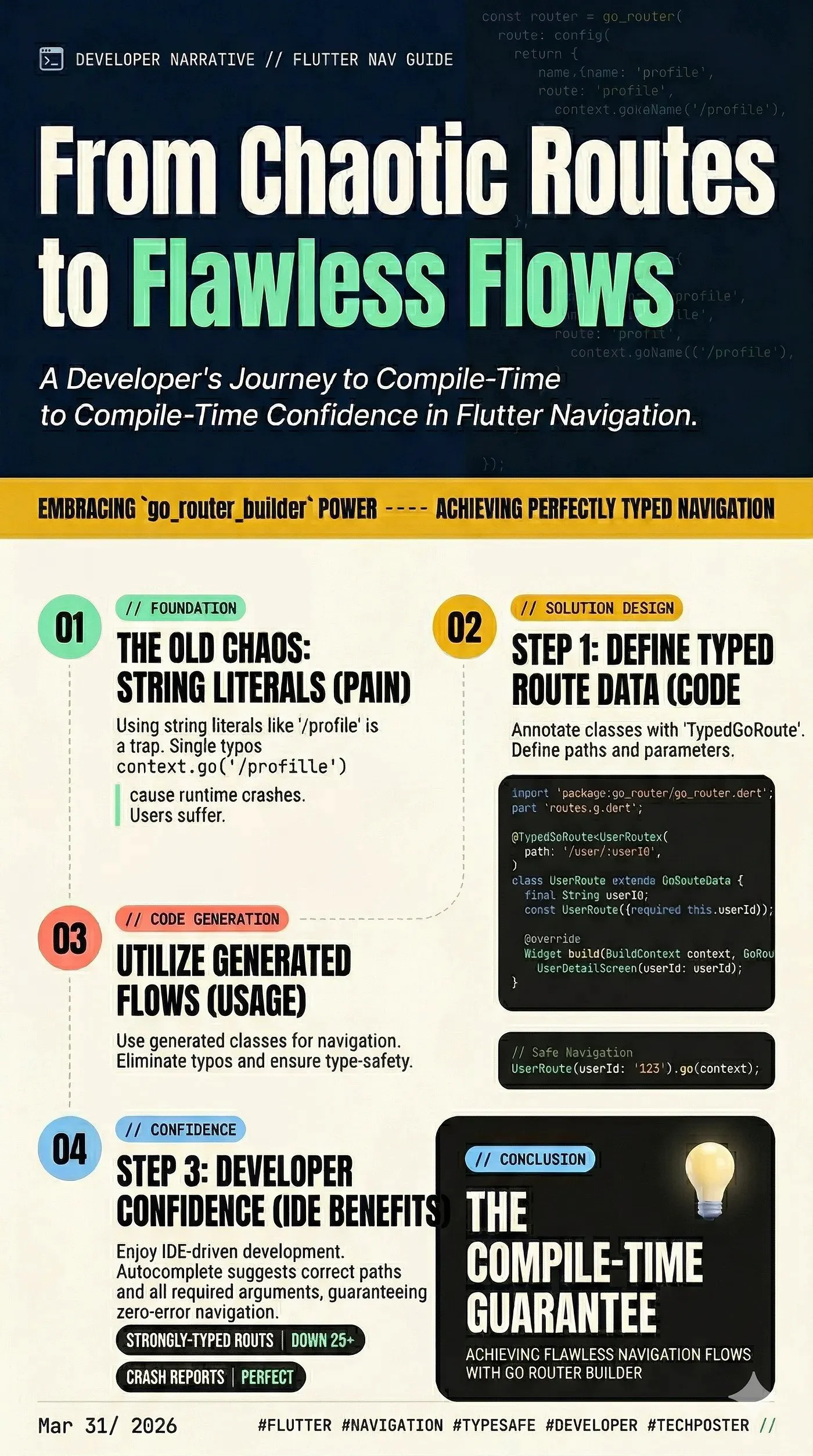
Nếu bạn đã xây dựng Flutter app được một thời gian, chắc chắn bạn biết rằng navigation có thể nhanh chóng trở thành một mớ hỗn độn với string-based routes và argument không được kiểm soát. Đó là lúc go_router xuất hiện — declarative routing package được Flutter team duy trì. Nó rất tuyệt, nhưng nếu chúng ta có thể làm cho nó tốt hơn nữa thì sao?
Bằng cách kết hợp go_router với go_router_builder, chúng ta có thể khai thác sức mạnh của code generation để đạt được type-safe navigation 100%. Không còn typo trong tên route, không còn phải đoán xem một màn hình cần những argument gì nữa.
Hãy cùng tìm hiểu cách thiết lập điều này!
Tại sao nên dùng go_router_builder?
----------------------------
Trong khi go_router thông thường dựa vào string (ví dụ: context.go('/details/42')), go_router_builder sinh ra các strongly-typed route object.
Lợi ích rất lớn:
Step 1: Thêm Dependencies
------------------------
Đầu tiên, hãy thêm các package cần thiết vào file pubspec.yaml của bạn. Bạn cần router package cùng với build tools cho code generation.
Chạy các lệnh sau trong terminal:
flutter pub add go_router
flutter pub add -d build_runner go_router_builder
Step 2: Định nghĩa Screens
---------------------------
Hãy tưởng tượng một app đơn giản với hai màn hình: một HomeScreen và một UserDetailScreen yêu cầu user ID.
// home_screen.dart
import 'package:flutter/material.dart';
class HomeScreen extends StatelessWidget {
  const HomeScreen({super.key});
  @override
  Widget build(BuildContext context) {
    return Scaffold(
      appBar: AppBar(title: const Text('Home')),
      body: Center(
        // We will add navigation here shortly!
        child: ElevatedButton(
          onPressed: () {},
          child: const Text('Go to User Details'),
        ),
      ),
    );
  }
}
// user_detail_screen.dart
import 'package:flutter/material.dart';
class UserDetailScreen extends StatelessWidget {
  final String userId;
  const UserDetailScreen({super.key, required this.userId});
  @override
  Widget build(BuildContext context) {
    return Scaffold(
      appBar: AppBar(title: const Text('User Details')),
      body: Center(child: Text('Viewing details for User: $userId')),
    );
  }
}
Step 3: Định nghĩa Routes
--------------------------
Thay vì một khối cấu hình router khổng lồ, chúng ta định nghĩa route bằng cách sử dụng các class kế thừa từ GoRouteData và annotate chúng với @TypedGoRoute.
Tạo một file tên app_routes.dart:
// app_routes.dart
import 'package:flutter/material.dart';
import 'package:go_router/go_router.dart';
import 'home_screen.dart';
import 'user_detail_screen.dart';
// This is the file that build_runner will generate
part 'app_routes.g.dart';
// 1. Define the Home Route
@TypedGoRoute<HomeRoute>(
  path: '/',
  routes: [    // 2. Define the User Detail Route as a nested route
    TypedGoRoute<UserDetailRoute>(
      path: 'user/:userId',
    ),
  ],
)
class HomeRoute extends GoRouteData {
  const HomeRoute();
  @override
  Widget build(BuildContext context, GoRouterState state)
    => const HomeScreen();
}
class UserDetailRoute extends GoRouteData {
  final String userId;
  // The builder will automatically extract 'userId' from the path
  const UserDetailRoute({required this.userId});
  @override
  Widget build(BuildContext context, GoRouterState state) {
    return UserDetailScreen(userId: userId);
  }
}
Step 4: Chạy Code Generator
------------------------------
Vì chúng ta đang dùng part 'app_routes.g.dart';, Dart sẽ báo lỗi cho đến khi chúng ta generate file đó. Mở terminal và chạy:
Bash
flutter pub run build_runner build --delete-conflicting-outputs
_(Mẹo: Dùng_ _watch_ _thay vì_ _build_ _nếu bạn muốn generator chạy tự động khi bạn thay đổi code)._
Sau khi lệnh này chạy xong, app_routes.g.dart sẽ được tạo ra và các lỗi sẽ biến mất!
Step 5: Khởi tạo Router
-----------------------------
Bây giờ, hãy thiết lập MaterialApp.router trong main.dart sử dụng danh sách $appRoutes được generate tự động.
// main.dart
import 'package:flutter/material.dart';
import 'package:go_router/go_router.dart';
import 'app_routes.dart';
void main() {
  runApp(const MyApp());
}
final GoRouter _router = GoRouter(
  // The generated list of routes from app_routes.g.dart
  routes: $appRoutes,
  initialLocation: '/',
);
class MyApp extends StatelessWidget {
  const MyApp({super.key});
  @override
  Widget build(BuildContext context) {
    return MaterialApp.router(
      title: 'Go Router Builder Demo',
      routerConfig: _router,
    );
  }
}
Step 6: Navigate với Type Safety!
----------------------------------
Đây là phần hay nhất. Thay vì gọi context.go('/user/123'), chúng ta có thể dùng trực tiếp route class đã được generate. Quay lại HomeScreen và cập nhật callback onPressed của button:
// Inside HomeScreen's build method:
ElevatedButton(
  onPressed: () {
    // Look at this beautifully typed navigation!
    const UserDetailRoute(userId: '123').go(context);
  },
  child: const Text('Go to User Details'),
)
Nếu bạn thay đổi userId thành kiểu integer trong định nghĩa route, compiler sẽ ngay lập tức đánh dấu button này là lỗi, giúp bạn tránh được một runtime crash!
Kết lại
-----------
Bằng cách áp dụng go_router_builder, bạn kết nối khoảng cách giữa declarative routing mạnh mẽ của Flutter và strict type safety của Dart. Mất thêm vài phút để thiết lập, nhưng sự yên tâm bạn có được khi scale app chắc chắn xứng đáng với công sức bỏ ra.
Happy coding!
Loading…