
Nếu bạn đã từng ship một Flutter app cho phép người dùng upload video 200 MB trên tàu điện ngầm, bạn chắc chắn hiểu nỗi đau đó: kết nối rớt ở 87%, người dùng mở lại app, và… mọi thứ bắt đầu từ đầu. Support ticket ập tới.
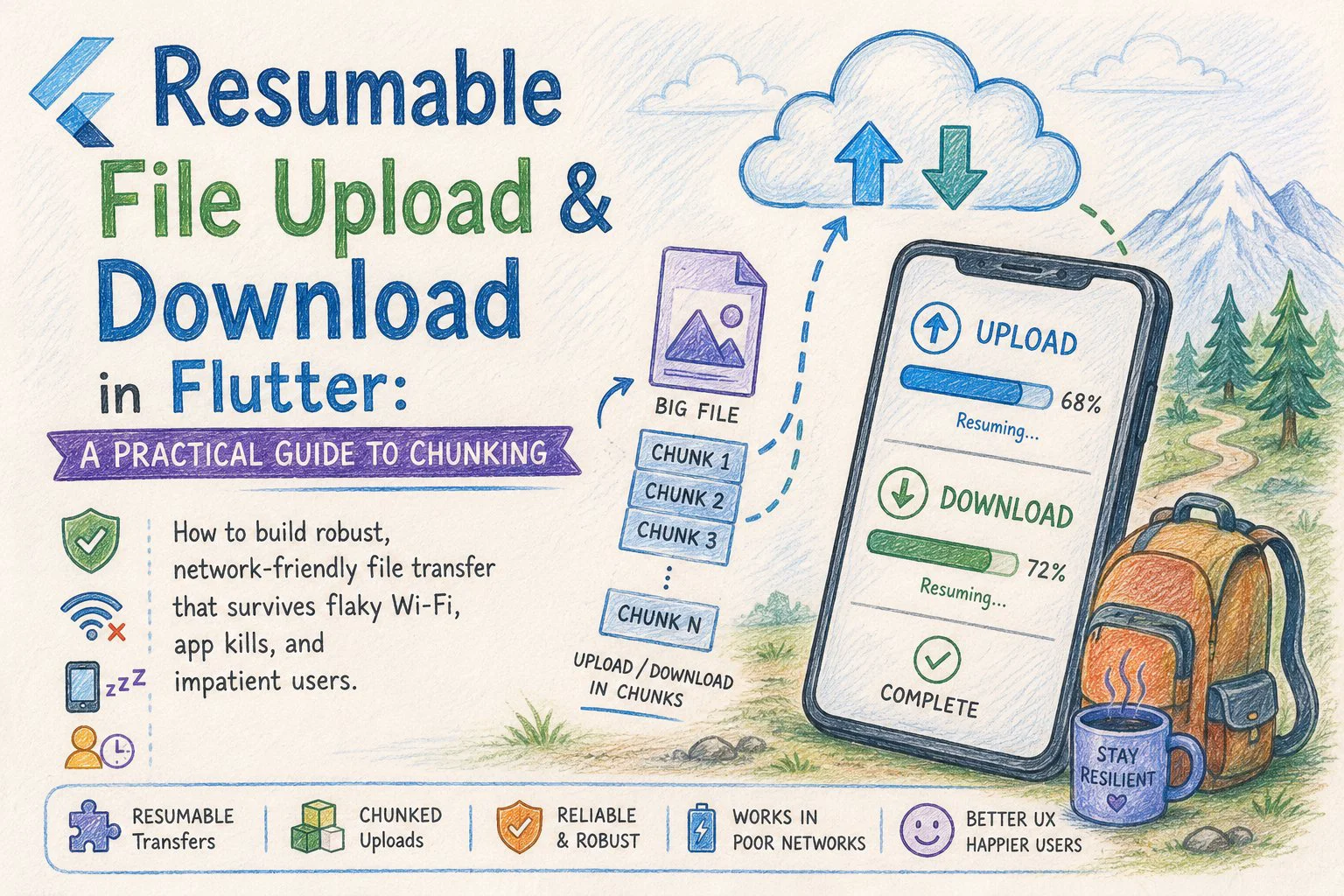
Cách khắc phục là chunked, resumable transfer — chia file thành các phần nhỏ, upload (hoặc download) từng phần một, theo dõi tiến độ trên disk, và tiếp tục chính xác từ chỗ bị dừng khi có sự cố.
Bài này đi qua một implementation theo hướng production trong Flutter cho cả hai chiều: upload và download. Tôi sẽ giữ code tập trung vào transfer logic để bạn có thể ghép vào bất kỳ kiến trúc nào (Bloc, Riverpod, Provider thuần — không quan trọng).
Tại sao phải chunking?
Một MultipartRequest đơn lẻ cho file lớn có ba vấn đề:
1. Không resume được. Mạng rớt 1 byte là phải upload lại toàn bộ.
2. Áp lực bộ nhớ. Load file 500 MB vào một Uint8List sẽ OOM trên các thiết bị Android tầm trung.
3. Không có progress chi tiết. Bạn có thể stream progress, nhưng không thể dễ dàng retry một slice đang lỗi.
Chunking giải quyết cả ba. Bạn đọc file dưới dạng stream của các byte range có kích thước cố định, gửi từng cái một cách độc lập, và coi server là nguồn sự thật cho "những gì đã có ở đó."
Chunk size hợp lý là 1–5 MB. Nhỏ hơn thì HTTP overhead nhiều hơn; lớn hơn thì lãng phí nhiều công hơn khi một chunk thất bại. Tôi sẽ dùng 2 MB trong các ví dụ.
Giao thức (phía server, tóm tắt)
Backend của bạn cần hỗ trợ ba thứ:
report.zip, tổng kích thước 180 MB, sha256 abc…". Server trả về một uploadId và byte offset để bắt đầu (0 cho upload mới, N cho resume).PUT /uploads/{uploadId} với header Content-Range: bytes start-end/total và raw chunk bytes trong body.POST /uploads/{uploadId}/complete — server ghép các chunk lại, xác minh hash, và trả về URL file cuối cùng.Với download, server chỉ cần hỗ trợ HTTP Range request (hầu hết CDN và S3-compatible store đều làm được điều này). Đó là header Range: bytes=start-end tiêu chuẩn — không cần protocol tùy chỉnh.
Bài này giả định phía server đã có sẵn. Giờ hãy xây dựng phần Flutter.
Cài đặt dự án
dependencies:
  dio: ^5.7.0
  path_provider: ^2.1.4
  crypto: ^3.0.5
  shared_preferences: ^2.3.2
Tôi dùng dio vì cancel token và progress callback khiến nó trở thành con đường ít trở ngại nhất cho loại công việc này. Package http chuẩn cũng được, bạn chỉ cần viết thêm nhiều boilerplate hơn.
Phần 1: Resumable upload
Transfer state
Toàn bộ bí quyết của resumability là persist vừa đủ state để khôi phục. Với upload, đó là:
class UploadSession {
  final String localPath;
  final String uploadId;
  final int totalBytes;
  final int chunkSize;
  int uploadedBytes;
  final String fileHash;

  UploadSession({
    required this.localPath,
    required this.uploadId,
    required this.totalBytes,
    required this.chunkSize,
    required this.uploadedBytes,
    required this.fileHash,
  });

  Map<String, dynamic> toJson() => {
        'localPath': localPath,
        'uploadId': uploadId,
        'totalBytes': totalBytes,
        'chunkSize': chunkSize,
        'uploadedBytes': uploadedBytes,
        'fileHash': fileHash,
      };

  factory UploadSession.fromJson(Map<String, dynamic> j) => UploadSession(
        localPath: j['localPath'],
        uploadId: j['uploadId'],
        totalBytes: j['totalBytes'],
        chunkSize: j['chunkSize'],
        uploadedBytes: j['uploadedBytes'],
        fileHash: j['fileHash'],
      );
}
Persist cái này vào SharedPreferences (nhỏ gọn, đơn giản) hoặc local DB nếu bạn có nhiều upload đồng thời. Key là đường dẫn file hoặc một session id.
Đọc chunk mà không làm bộ nhớ nổ tung
Đừng đọc toàn bộ file. Dùng RandomAccessFile và chỉ đọc đúng range bạn cần:
Future<Uint8List> _readChunk(File file, int start, int length) async {
  final raf = await file.open(mode: FileMode.read);
  try {
    await raf.setPosition(start);
    return await raf.read(length);
  } finally {
    await raf.close();
  }
}
Mỗi chunk chỉ tồn tại trong bộ nhớ trong suốt thời gian HTTP request của nó. File 200 MB chỉ dùng ~2 MB RAM tại bất kỳ thời điểm nào.
Upload loop
class ChunkedUploader {
  final Dio _dio;
  final String _baseUrl;
  static const int _chunkSize = 2 * 1024 * 1024; // 2 MB

  ChunkedUploader(this._dio, this._baseUrl);

  Future<String> upload(
    File file, {
    required void Function(double progress) onProgress,
    CancelToken? cancelToken,
  }) async {
    final session = await _resumeOrInitiate(file);

    while (session.uploadedBytes < session.totalBytes) {
      final start = session.uploadedBytes;
      final end = (start + _chunkSize > session.totalBytes)
          ? session.totalBytes
          : start + _chunkSize;
      final length = end - start;

      final chunk = await _readChunk(file, start, length);

      await _uploadChunkWithRetry(
        session: session,
        chunk: chunk,
        start: start,
        end: end - 1, // Content-Range is inclusive
        cancelToken: cancelToken,
      );

      session.uploadedBytes = end;
      await _persist(session);
      onProgress(session.uploadedBytes / session.totalBytes);
    }

    final fileUrl = await _complete(session);
    await _clear(session);
    return fileUrl;
  }
}
Cấu trúc này cố tình đơn điệu: đọc, gửi, persist, lặp lại. Mỗi chunk thành công là một checkpoint.
Per-chunk retry với exponential backoff
Lỗi mạng là chuyện thường ngày, không phải ngoại lệ. Bọc mỗi chunk PUT với số lần retry có giới hạn:
Future<void> _uploadChunkWithRetry({
  required UploadSession session,
  required Uint8List chunk,
  required int start,
  required int end,
  CancelToken? cancelToken,
}) async {
  const maxAttempts = 5;
  for (var attempt = 1; attempt <= maxAttempts; attempt++) {
    try {
      await _dio.put(
        '$_baseUrl/uploads/${session.uploadId}',
        data: Stream.fromIterable([chunk]),
        options: Options(
          headers: {
            'Content-Range': 'bytes $start-$end/${session.totalBytes}',
            'Content-Length': chunk.length,
            'Content-Type': 'application/octet-stream',
          },
        ),
        cancelToken: cancelToken,
      );
      return;
    } on DioException catch (e) {
      if (e.type == DioExceptionType.cancel) rethrow;
      if (attempt == maxAttempts) rethrow;
      // Exponential backoff with jitter: 1s, 2s, 4s, 8s …
      final delay = Duration(
        milliseconds: 1000 * (1 << (attempt - 1)) +
            Random().nextInt(500),
      );
      await Future.delayed(delay);
    }
  }
}
Hai chi tiết đáng chú ý. Thứ nhất, không bao giờ retry khi bị cancel — rethrow ngay lập tức. Thứ hai, jitter ngăn chặn thundering-herd problem khi nhiều client kết nối lại cùng lúc sau một sự cố vùng.
Initiate hoặc resume
Khi upload bắt đầu, hỏi server xem nó đã có gì rồi:
Future<UploadSession> _resumeOrInitiate(File file) async {
  final existing = await _loadSession(file.path);
  if (existing != null) {
    // Trust but verify — ask the server how far we actually got.
    final resp = await _dio.head(
      '$_baseUrl/uploads/${existing.uploadId}',
    );
    final serverOffset =
        int.tryParse(resp.headers.value('x-upload-offset') ?? '') ?? 0;
    existing.uploadedBytes = serverOffset;
    return existing;
  }

  final hash = await _sha256(file);
  final resp = await _dio.post(
    '$_baseUrl/uploads',
    data: {
      'fileName': p.basename(file.path),
      'totalBytes': await file.length(),
      'sha256': hash,
    },
  );
  return UploadSession(
    localPath: file.path,
    uploadId: resp.data['uploadId'],
    totalBytes: await file.length(),
    chunkSize: _chunkSize,
    uploadedBytes: 0,
    fileHash: hash,
  );
}
Luôn tin offset của server hơn bản được cache cục bộ. Bản local có thể lệch nếu một chunk request thực sự thành công nhưng response bị mất — server đã có nó, client không biết, và nếu thiếu bước reconciliation này bạn sẽ gửi trùng chunk đó.
Phần 2: Resumable download
Download đơn giản hơn vì HTTP Range được tích hợp sẵn trong mọi HTTP server hợp lý. Client chỉ cần theo dõi số byte đã có trên disk và yêu cầu phần còn lại.
class ChunkedDownloader {
  final Dio _dio;
  static const int _chunkSize = 2 * 1024 * 1024;

  ChunkedDownloader(this._dio);

  Future<File> download(
    String url,
    String savePath, {
    required void Function(double) onProgress,
    CancelToken? cancelToken,
  }) async {
    final partialFile = File('$savePath.part');
    int downloaded =
        await partialFile.exists() ? await partialFile.length() : 0;

    final headResp = await _dio.head(url);
    final totalBytes = int.parse(
      headResp.headers.value(Headers.contentLengthHeader)!,
    );

    if (downloaded >= totalBytes) {
      await partialFile.rename(savePath);
      return File(savePath);
    }

    final sink = partialFile.openWrite(mode: FileMode.append);

    try {
      while (downloaded < totalBytes) {
        final end = (downloaded + _chunkSize > totalBytes)
            ? totalBytes - 1
            : downloaded + _chunkSize - 1;

        final chunk = await _fetchChunkWithRetry(
          url, downloaded, end, cancelToken,
        );
        sink.add(chunk);
        await sink.flush();

        downloaded = end + 1;
        onProgress(downloaded / totalBytes);
      }
    } finally {
      await sink.close();
    }

    await partialFile.rename(savePath);
    return File(savePath);
  }

  Future<List<int>> _fetchChunkWithRetry(
    String url, int start, int end, CancelToken? cancelToken,
  ) async {
    const maxAttempts = 5;
    for (var attempt = 1; attempt <= maxAttempts; attempt++) {
      try {
        final resp = await _dio.get<List<int>>(
          url,
          options: Options(
            responseType: ResponseType.bytes,
            headers: {'Range': 'bytes=$start-$end'},
          ),
          cancelToken: cancelToken,
        );
        return resp.data!;
      } on DioException catch (e) {
        if (e.type == DioExceptionType.cancel) rethrow;
        if (attempt == maxAttempts) rethrow;
        await Future.delayed(
          Duration(milliseconds: 1000 * (1 << (attempt - 1))),
        );
      }
    }
    throw StateError('unreachable');
  }
}
Hai pattern đáng chú ý:
Hậu tố .part. Không bao giờ ghi trực tiếp vào filename cuối cùng. Nếu người dùng kill app giữa chừng khi đang download rồi khởi động lại, bạn không muốn nhầm một file viết dở với file hoàn chỉnh. rename atomic ở cuối chính là "commit" của bạn.
flush sau mỗi chunk. Chậm hơn buffering, nhưng đây là thứ đảm bảo số byte trên disk thực sự tương ứng với "dữ liệu an toàn nếu process chết ngay lúc này."
Xác minh kết quả
Sau khi download hoàn tất, xác minh SHA-256 nếu server của bạn cung cấp:
Future<bool> _verify(File file, String expectedHash) async {
  final stream = file.openRead();
  final digest = await sha256.bind(stream).first;
  return digest.toString() == expectedHash;
}
Cái này bắt trường hợp hiếm gặp nhưng có thật: từng chunk thành công riêng lẻ nhưng file được ghép lại bị corrupt (disk hỏng, lỗi byte order, bug phía server). Nếu xác minh thất bại, xóa file và bắt đầu lại — silent corruption còn tệ hơn phải download lại.
Các edge case cắn bạn trên production
Một số tình huống không xuất hiện trong happy path:
Người dùng đổi network giữa chừng, từ Wi-Fi sang 4G. Request hiện tại thường fail với connection error; retry loop của bạn xử lý được, nhưng bạn cũng nên lắng nghe connectivity_plus và tạm dừng loop khi offline thay vì đốt hết retry vào hư vô.
File thay đổi trên disk trong khi đang upload. Hash file lúc bắt đầu session và re-hash một leading chunk nhỏ trước mỗi lần resume — nếu không khớp, hủy session và bắt đầu lại. Nếu không bạn sẽ gửi một file Frankenstein.
Giới hạn background execution trên iOS. iOS cho bạn khoảng 30 giây sau khi app chuyển sang background trước khi bị suspend. Với các transfer lớn, hãy xem xét BGTaskScheduler (thông qua workmanager) hoặc URLSession background upload (thông qua platform channel). Một vòng lặp thuần Dart sẽ tạm dừng khi người dùng chuyển app.
Dung lượng disk. Kiểm tra getFreeDiskSpace (thông qua một platform channel nhỏ hoặc disk_space_plus) trước khi bắt đầu download. Thất bại giữa chừng với lỗi "no space left on device" để lại một file .part mồ côi và người dùng bực bội.
Upload chunk song song. Hấp dẫn vì tốc độ, nhưng hầu hết server vẫn serialize write vào một upload session đơn lẻ, và các chunk song song làm phức tạp đáng kể việc theo dõi offset. Hãy làm chắc phiên bản tuần tự trước; chỉ song song hóa nếu profiling chứng minh điều đó thực sự cần thiết.
Kết nối vào UI
Các class transfer phía trên expose API dạng Stream<double> thông qua callback onProgress, phù hợp với mọi cách tiếp cận state management:
final uploader = ChunkedUploader(dio, 'https://api.example.com');
final cancelToken = CancelToken();

try {
  final url = await uploader.upload(
    File('/path/to/big.zip'),
    onProgress: (p) => setState(() => _progress = p),
    cancelToken: cancelToken,
  );
  showSnack('Uploaded: $url');
} on DioException catch (e) {
  if (e.type == DioExceptionType.cancel) return;
  showSnack('Upload failed — tap to resume');
}
Cái "tap to resume" chính là toàn bộ ý nghĩa. Vì session được persist, gọi upload lại với cùng File sẽ tiếp tục từ chỗ đã dừng. Trải nghiệm người dùng là "mạng trở lại, transfer tiếp tục" — đó là chuẩn mà app của bạn nên đạt được.
Tổng kết
Chunked, resumable transfer là một trong những tính năng người dùng không bao giờ để ý khi nó hoạt động và không bao giờ tha thứ khi nó không. Implementation thực ra không phức tạp — ba bốn trăm dòng Dart cho cả hai chiều — nhưng đòi hỏi bạn phải thành thật về các failure mode không xuất hiện trên Wi-Fi gigabit ở văn phòng của developer.
Mental model cốt lõi: mỗi chunk thành công là một checkpoint, server là nguồn sự thật cho upload offset, và file .part cộng với atomic rename giữ cho download trung thực. Nắm vững ba nguyên tắc đó, phần còn lại chỉ là bookkeeping.
Happy coding : )
Loading…