
If you've ever shipped a Flutter app that lets users upload a 200 MB video on a metro train, you already know the pain: the connection drops at 87%, the user reopens the app, and… everything starts from zero. Cue support tickets.
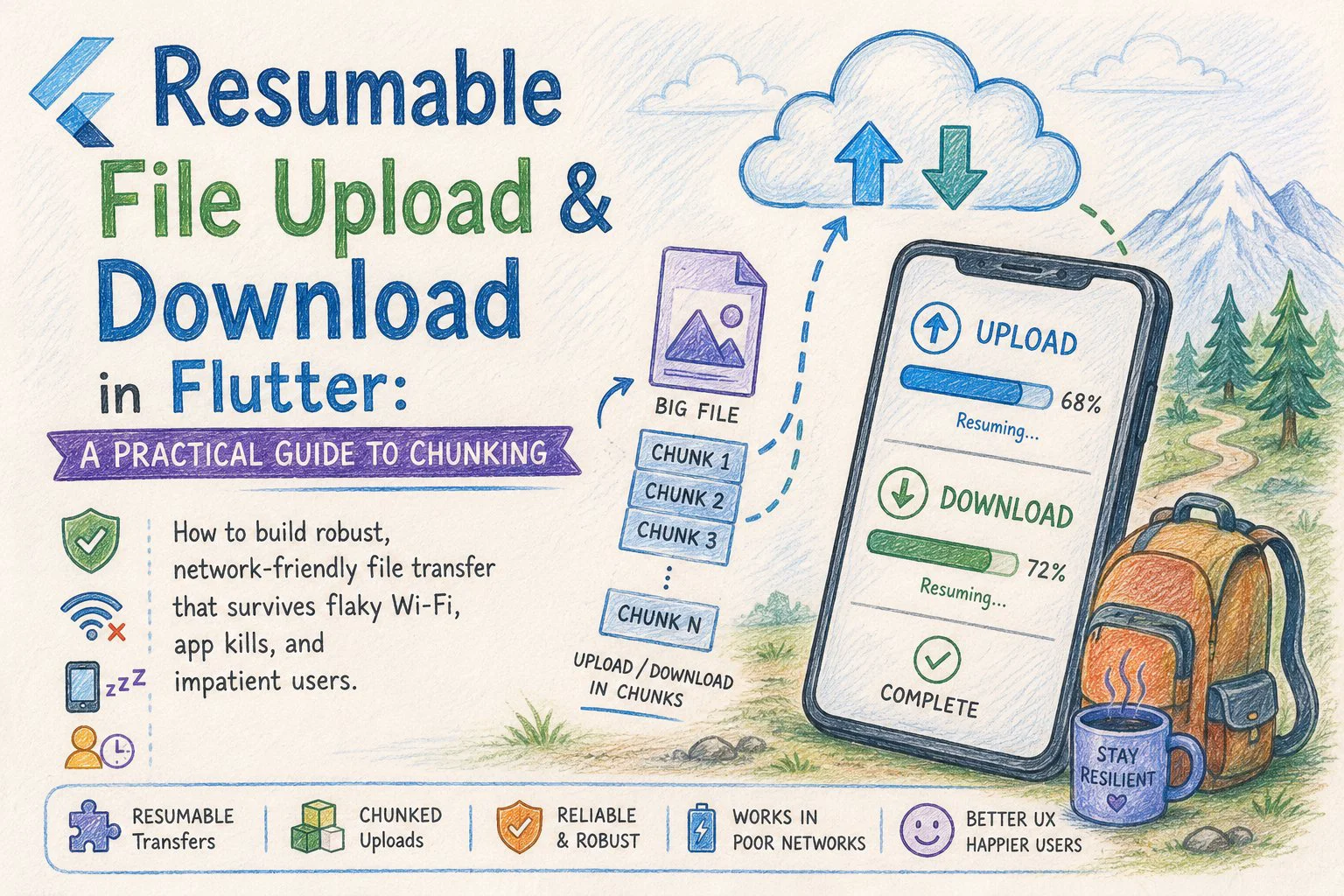
The fix is chunked, resumable transfer — split the file into small pieces, upload (or download) them one by one, track progress on disk, and pick up exactly where you left off when something goes wrong.
This post walks through a production-minded implementation in Flutter for both directions: upload and download. I'll keep the code focused on the transfer logic itself so you can drop it into any architecture (Bloc, Riverpod, plain Provider — doesn't matter).
Why chunking?
A single MultipartRequest for a large file has three problems:
1. No resume. A 1-byte network blip and you re-upload everything.
2. Memory pressure. Loading a 500 MB file into a Uint8List will OOM on mid-range Android devices.
3. No granular progress. You can stream progress, but you can't easily retry a failing slice.
Chunking solves all three. You read the file as a stream of fixed-size byte ranges, send each one independently, and treat the server as the source of truth for "what's already there."
A reasonable chunk size is 1–5 MB. Smaller means more HTTP overhead; larger means more wasted work when a chunk fails. I'll use 2 MB in the examples.
The protocol (server side, briefly)
Your backend needs to support three things:
report.zip, total size 180 MB, sha256 abc…". Server responds with an uploadId and the byte offset to start from (0 for new uploads, N for resumes).PUT /uploads/{uploadId} with a Content-Range: bytes start-end/total header and the raw chunk bytes as the body.POST /uploads/{uploadId}/complete — server stitches chunks, verifies the hash, and returns the final file URL.For downloads, the server just needs to support HTTP Range requests (most CDNs and S3-compatible stores already do). That's the standard Range: bytes=start-end header — no custom protocol needed.
This article assumes the server-side is in place. Now let's build the Flutter side.
Project setup
dependencies:
  dio: ^5.7.0
  path_provider: ^2.1.4
  crypto: ^3.0.5
  shared_preferences: ^2.3.2
I'm using dio because cancel tokens and progress callbacks make it the path of least resistance for this kind of work. The standard http package works too, you just write more boilerplate.
Part 1: Resumable upload
The transfer state
The whole trick to resumability is persisting just enough state to recover. For uploads, that's:
class UploadSession {
  final String localPath;
  final String uploadId;
  final int totalBytes;
  final int chunkSize;
  int uploadedBytes;
  final String fileHash;

  UploadSession({
    required this.localPath,
    required this.uploadId,
    required this.totalBytes,
    required this.chunkSize,
    required this.uploadedBytes,
    required this.fileHash,
  });

  Map<String, dynamic> toJson() => {
        'localPath': localPath,
        'uploadId': uploadId,
        'totalBytes': totalBytes,
        'chunkSize': chunkSize,
        'uploadedBytes': uploadedBytes,
        'fileHash': fileHash,
      };

  factory UploadSession.fromJson(Map<String, dynamic> j) => UploadSession(
        localPath: j['localPath'],
        uploadId: j['uploadId'],
        totalBytes: j['totalBytes'],
        chunkSize: j['chunkSize'],
        uploadedBytes: j['uploadedBytes'],
        fileHash: j['fileHash'],
      );
}
Persist this to SharedPreferences (small, simple) or a local DB if you have many concurrent uploads. The key is the file path or a session id.
Reading a chunk without exploding memory
Don't read the whole file. Use RandomAccessFile and read only the range you need:
Future<Uint8List> _readChunk(File file, int start, int length) async {
  final raf = await file.open(mode: FileMode.read);
  try {
    await raf.setPosition(start);
    return await raf.read(length);
  } finally {
    await raf.close();
  }
}
Each chunk lives in memory only for the duration of its HTTP request. A 200 MB file uses ~2 MB of RAM at any moment.
The upload loop
class ChunkedUploader {
  final Dio _dio;
  final String _baseUrl;
  static const int _chunkSize = 2 * 1024 * 1024; // 2 MB

  ChunkedUploader(this._dio, this._baseUrl);

  Future<String> upload(
    File file, {
    required void Function(double progress) onProgress,
    CancelToken? cancelToken,
  }) async {
    final session = await _resumeOrInitiate(file);

    while (session.uploadedBytes < session.totalBytes) {
      final start = session.uploadedBytes;
      final end = (start + _chunkSize > session.totalBytes)
          ? session.totalBytes
          : start + _chunkSize;
      final length = end - start;

      final chunk = await _readChunk(file, start, length);

      await _uploadChunkWithRetry(
        session: session,
        chunk: chunk,
        start: start,
        end: end - 1, // Content-Range is inclusive
        cancelToken: cancelToken,
      );

      session.uploadedBytes = end;
      await _persist(session);
      onProgress(session.uploadedBytes / session.totalBytes);
    }

    final fileUrl = await _complete(session);
    await _clear(session);
    return fileUrl;
  }
}
The structure is deliberately boring: read, send, persist, repeat. Every successful chunk is a checkpoint.
Per-chunk retries with exponential backoff
Network errors are the rule, not the exception. Wrap each chunk PUT with bounded retries:
Future<void> _uploadChunkWithRetry({
  required UploadSession session,
  required Uint8List chunk,
  required int start,
  required int end,
  CancelToken? cancelToken,
}) async {
  const maxAttempts = 5;
  for (var attempt = 1; attempt <= maxAttempts; attempt++) {
    try {
      await _dio.put(
        '$_baseUrl/uploads/${session.uploadId}',
        data: Stream.fromIterable([chunk]),
        options: Options(
          headers: {
            'Content-Range': 'bytes $start-$end/${session.totalBytes}',
            'Content-Length': chunk.length,
            'Content-Type': 'application/octet-stream',
          },
        ),
        cancelToken: cancelToken,
      );
      return;
    } on DioException catch (e) {
      if (e.type == DioExceptionType.cancel) rethrow;
      if (attempt == maxAttempts) rethrow;
      // Exponential backoff with jitter: 1s, 2s, 4s, 8s …
      final delay = Duration(
        milliseconds: 1000 * (1 << (attempt - 1)) +
            Random().nextInt(500),
      );
      await Future.delayed(delay);
    }
  }
}
Two details worth flagging. First, never retry on cancellation — rethrow immediately. Second, the jitter prevents the thundering-herd problem when many clients reconnect at once after a regional outage.
Initiate or resume
When the upload starts, ask the server what it already has:
Future<UploadSession> _resumeOrInitiate(File file) async {
  final existing = await _loadSession(file.path);
  if (existing != null) {
    // Trust but verify — ask the server how far we actually got.
    final resp = await _dio.head(
      '$_baseUrl/uploads/${existing.uploadId}',
    );
    final serverOffset =
        int.tryParse(resp.headers.value('x-upload-offset') ?? '') ?? 0;
    existing.uploadedBytes = serverOffset;
    return existing;
  }

  final hash = await _sha256(file);
  final resp = await _dio.post(
    '$_baseUrl/uploads',
    data: {
      'fileName': p.basename(file.path),
      'totalBytes': await file.length(),
      'sha256': hash,
    },
  );
  return UploadSession(
    localPath: file.path,
    uploadId: resp.data['uploadId'],
    totalBytes: await file.length(),
    chunkSize: _chunkSize,
    uploadedBytes: 0,
    fileHash: hash,
  );
}
Always trust the server's offset over the locally-cached one. The local copy can drift if a chunk request actually succeeded but its response was lost — the server has it, the client doesn't know, and without this reconciliation you'd duplicate that chunk.
Part 2: Resumable download
Downloads are simpler because HTTP Range is built into every reasonable HTTP server. The client just needs to track how many bytes are already on disk and ask for the rest.
class ChunkedDownloader {
  final Dio _dio;
  static const int _chunkSize = 2 * 1024 * 1024;

  ChunkedDownloader(this._dio);

  Future<File> download(
    String url,
    String savePath, {
    required void Function(double) onProgress,
    CancelToken? cancelToken,
  }) async {
    final partialFile = File('$savePath.part');
    int downloaded =
        await partialFile.exists() ? await partialFile.length() : 0;

    final headResp = await _dio.head(url);
    final totalBytes = int.parse(
      headResp.headers.value(Headers.contentLengthHeader)!,
    );

    if (downloaded >= totalBytes) {
      await partialFile.rename(savePath);
      return File(savePath);
    }

    final sink = partialFile.openWrite(mode: FileMode.append);

    try {
      while (downloaded < totalBytes) {
        final end = (downloaded + _chunkSize > totalBytes)
            ? totalBytes - 1
            : downloaded + _chunkSize - 1;

        final chunk = await _fetchChunkWithRetry(
          url, downloaded, end, cancelToken,
        );
        sink.add(chunk);
        await sink.flush();

        downloaded = end + 1;
        onProgress(downloaded / totalBytes);
      }
    } finally {
      await sink.close();
    }

    await partialFile.rename(savePath);
    return File(savePath);
  }

  Future<List<int>> _fetchChunkWithRetry(
    String url, int start, int end, CancelToken? cancelToken,
  ) async {
    const maxAttempts = 5;
    for (var attempt = 1; attempt <= maxAttempts; attempt++) {
      try {
        final resp = await _dio.get<List<int>>(
          url,
          options: Options(
            responseType: ResponseType.bytes,
            headers: {'Range': 'bytes=$start-$end'},
          ),
          cancelToken: cancelToken,
        );
        return resp.data!;
      } on DioException catch (e) {
        if (e.type == DioExceptionType.cancel) rethrow;
        if (attempt == maxAttempts) rethrow;
        await Future.delayed(
          Duration(milliseconds: 1000 * (1 << (attempt - 1))),
        );
      }
    }
    throw StateError('unreachable');
  }
}
Two patterns worth highlighting:
The .part suffix. Never write directly to the final filename. If the user kills the app halfway through a download and restarts, you don't want to confuse a half-written file for a complete one. The atomic rename at the end is your "commit."
flush after each chunk. It's slower than buffering, but it's what makes the on-disk byte count actually correspond to "data that's safe if the process dies right now."
Verifying the result
After download completes, verify the SHA-256 if your server provides one:
Future<bool> _verify(File file, String expectedHash) async {
  final stream = file.openRead();
  final digest = await sha256.bind(stream).first;
  return digest.toString() == expectedHash;
}
This catches the rare-but-real case where chunks succeed individually but the assembled file is corrupted (bad disk, byte-order mistake, server bug). If verification fails, delete the file and start over — silent corruption is worse than a re-download.
Edge cases that bite in production
A handful of scenarios that don't show up in the happy path:
The user changes networks mid-transfer, going from Wi-Fi to cellular. The current request usually fails with a connection error; your retry loop handles it, but you should also listen to connectivity_plus and pause the loop while offline rather than burning retries against nothing.
The file changes on disk while uploading. Hash the file at session start and re-hash a small leading chunk before each resume — if it mismatches, invalidate the session and start over. Otherwise you'll send a frankenstein file.
Background execution limits on iOS. iOS gives you roughly 30 seconds after the app backgrounds before suspending. For large transfers, look at BGTaskScheduler (via workmanager) or URLSession background uploads (via a platform channel). A pure-Dart loop will pause when the user switches apps.
Disk space. Check getFreeDiskSpace (via a small platform channel or disk_space_plus) before starting a download. Failing partway through with "no space left on device" leaves a stale .part file and a frustrated user.
Concurrent chunk uploads. Tempting for speed, but most servers serialize writes to a single upload session anyway, and parallel chunks complicate the offset bookkeeping considerably. Get the sequential version solid first; only parallelize if profiling proves it matters.
Wiring it into the UI
The transfer classes above expose a Stream<double>-shaped API via the onProgress callback, which slots cleanly into any state management approach:
final uploader = ChunkedUploader(dio, 'https://api.example.com');
final cancelToken = CancelToken();

try {
  final url = await uploader.upload(
    File('/path/to/big.zip'),
    onProgress: (p) => setState(() => _progress = p),
    cancelToken: cancelToken,
  );
  showSnack('Uploaded: $url');
} on DioException catch (e) {
  if (e.type == DioExceptionType.cancel) return;
  showSnack('Upload failed — tap to resume');
}
The "tap to resume" is the whole point. Because the session is persisted, calling upload again with the same File picks up where it left off. The user experience is "internet came back, transfer continued" — which is the bar your app should clear.
Wrapping up
Chunked, resumable transfer is one of those features users never notice when it works and never forgive when it doesn't. The implementation is genuinely not complicated — three or four hundred lines of Dart for both directions — but it requires being honest about failure modes that don't show up on a developer's gigabit office Wi-Fi.
The core mental model: every successful chunk is a checkpoint, the server is the source of truth for upload offsets, and .part files plus atomic rename keep downloads honest. Hold those three principles, and the rest is bookkeeping.
Happy coding : )
Loading…