
Khi một Flutter application phát triển từ prototype đơn giản thành sản phẩm enterprise phức tạp, cách bạn tổ chức code trở nên quan trọng không kém gì bản thân code đó. Nếu bạn đã từng nhìn chằm chằm vào một lib folder khổng lồ, monolithic và cảm thấy hoảng loạn khi cố gỡ rối các dependency, thì bạn không hề đơn độc.
Feature-based architecture (đóng gói theo feature thay vì theo layer) trong một codebase duy nhất đã là một bước tiến lớn, nhưng đôi khi như vậy vẫn chưa đủ. Khi nhiều team cùng làm việc song song, hoặc khi bạn có những feature riêng biệt cần được cô lập triệt để, việc tách feature-based architecture ra thành nhiều repository (polyrepo) có thể thay đổi cuộc chơi.
Dưới đây là phân tích chuyên sâu về lý do nên cân nhắc multi-repo feature-based architecture trong Flutter, và cách triển khai nó cụ thể như thế nào.
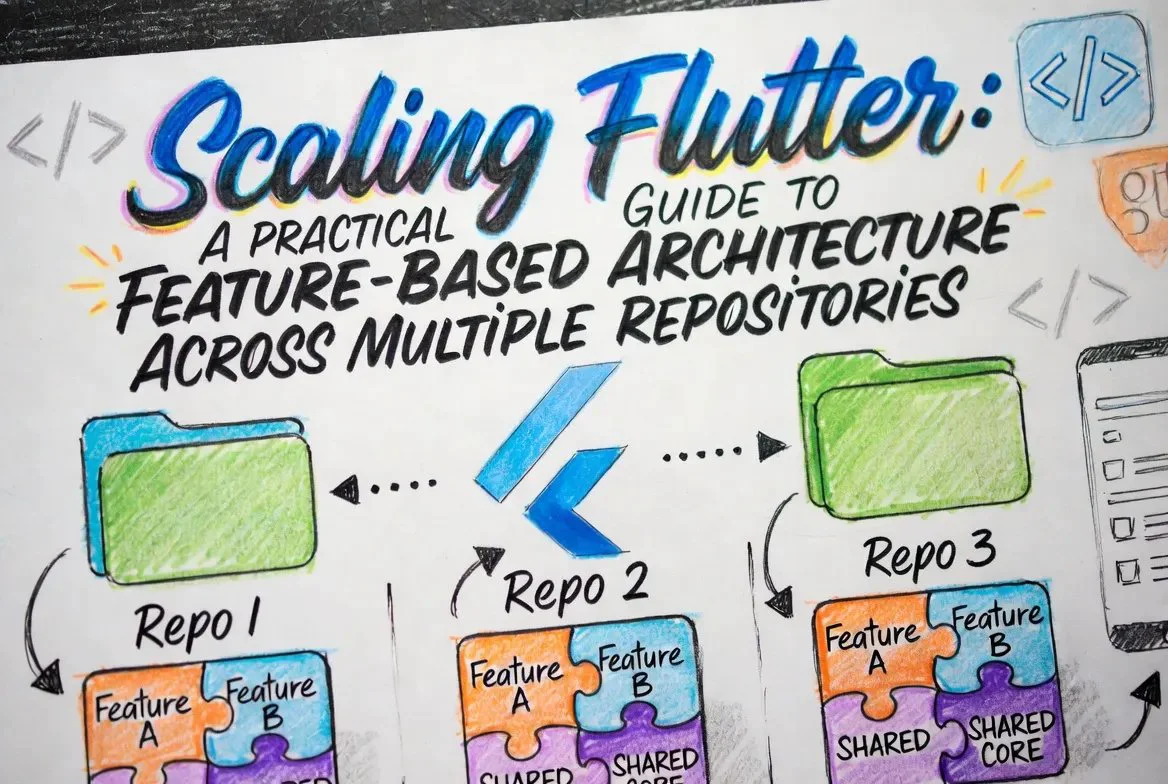
Tại Sao Multi-Repo?
Trước khi xé toạc codebase ra, cần hiểu rõ những vấn đề cụ thể mà multi-repo setup giải quyết được:
Cấu Trúc Architecture
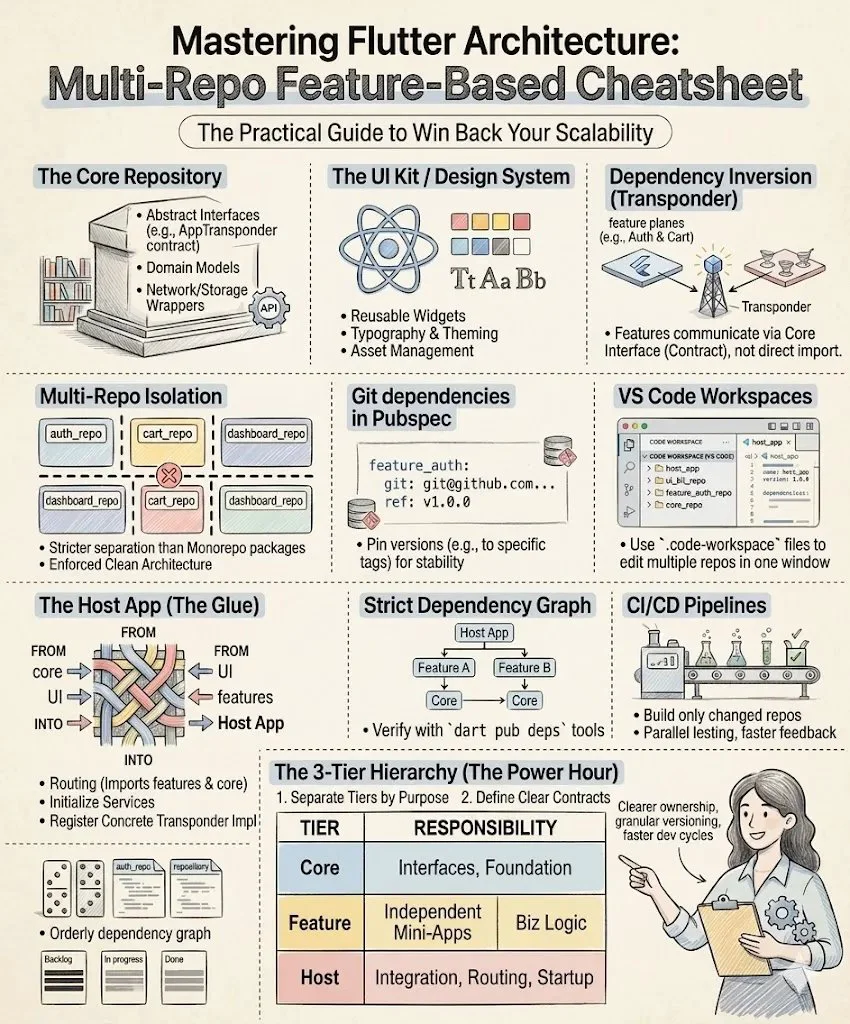
Để làm cho điều này hoạt động trơn tru, bạn cần một hierarchy rõ ràng. Một multi-repo Flutter architecture điển hình gồm ba tầng chính:
1. Core & Shared Repositories (Nền Móng)
Đây là những repository ở cấp thấp nhất. Chúng không biết gì về các feature cụ thể của bạn và được tái sử dụng rộng rãi.
1.The Core & Shared Repositories (The Foundation)
/organization_root
│
├── core_domain/                # Business Logic & Interfaces (The "Brains")
│   ├── lib/
│   │   ├── src/
│   │   │   ├── transponder/
│   │   │   │   ├── app_transponder.dart  # Abstract interface definition
│   │   │   │   └── app_event.dart        # Base event classes
│   │   │   ├── models/                   # Global entities (e.g., User, Order)
│   │   │   └── failures/                 # Shared error/exception handling
│   │   └── core_domain.dart              # Main barrel file
│   └── pubspec.yaml
│
├── core_ui/                    # The Design System (The "Look")
│   ├── assets/                 # Shared fonts, icons, and logos
│   ├── lib/
│   │   ├── src/
│   │   │   ├── theme/
│   │   │   │   ├── app_colors.dart       # Brand color palette
│   │   │   │   └── app_typography.dart   # Text styles
│   │   │   └── widgets/                  # Atomic UI components
│   │   │       ├── custom_button.dart
│   │   │       └── loading_indicator.dart
│   │   └── core_ui.dart                  # Main barrel file
│   └── pubspec.yaml
│
└── core_infrastructure/        # Third-party & System Wrappers (The "Tools")
    ├── lib/
    │   ├── src/
    │   │   ├── network/
    │   │   │   ├── api_client.dart       # Dio or Http wrapper
    │   │   │   └── endpoints.dart        # Shared API constants
    │   │   ├── storage/
    │   │   │   └── local_storage.dart    # Shared preferences or Hive setup
    │   │   └── analytics/
    │   │       └── firebase_logger.dart  # Analytics wrapper
    │   └── core_infrastructure.dart
    └── pubspec.yaml
2. Feature Repositories (Các Khối Xây Dựng)
Những repository này chứa business logic và UI thực sự cho từng domain riêng biệt của app.
feature_auth, feature_dashboard, feature_settings).2.The Features Repositories (The Building Blocks)
/organization_root
│
├── feature_checkout/ # Business domain for payments & orders
│ ├── lib/
│ │ ├── src/
│ │ │ ├── data/ # Repositories & Data Sources (API calls)
│ │ │ ├── domain/ # Use Cases & Local Entities
│ │ │ └── presentation/ # UI, State Management & Controllers
│ │ │ ├── checkout_screen.dart
│ │ │ └── checkout_controller.dart <-- Broadcasts OrderPlacedEvent
│ │ └── feature_checkout.dart
│ ├── test/ # Isolated unit & widget tests
│ └── pubspec.yaml # Depends on core_domain, core_ui, core_infra
│
├── feature_dashboard/ # Business domain for overview & stats
│ ├── lib/
│ │ ├── src/
│ │ │ ├── domain/
│ │ │ └── presentation/
│ │ │ ├── dashboard_screen.dart
│ │ │ └── activity_badge.dart <-- Listens for OrderPlacedEvent
│ │ └── feature_dashboard.dart
│ ├── test/
│ └── pubspec.yaml # Depends on core_domain, core_ui
│
└── feature_auth/ # Business domain for login & registration
├── lib/
│ ├── src/
│ │ ├── domain/
│ │ └── presentation/
│ │ └── login_screen.dart
│ └── feature_auth.dart
├── test/
└── pubspec.yaml
3. Host Application (Lớp Kết Nối)
Đây là Flutter application thực sự của bạn. Nó nhẹ đến mức đáng ngạc nhiên. Nhiệm vụ duy nhất của nó là:
3. The Host Application (The Glue)
/organization_root
│
└── host_app/                   # The main executable Flutter project
    ├── lib/
    │   ├── src/
    │   │   ├── di/             # The Wiring Room
    │   │   │   ├── injection.dart        # GetIt setup; Implements AppTransponder
    │   │   │   └── feature_modules.dart  # Inits individual feature dependencies
    │   │   │
    │   │   ├── routing/        # The Map
    │   │   │   ├── app_router.dart       # GoRouter/AutoRoute; Imports feature screens
    │   │   │   └── routes.dart           # Route name constants
    │   │   │
    │   │   ├── app.dart        # The Root Widget (MaterialApp, Theme setup)
    │   │   └── config/         # Environment flavors (dev, staging, prod)
    │   │
    │   └── main.dart           # Entry point: runs app and triggers DI
    │
    ├── assets/                 # App icons and splash screens
    ├── test_driver/            # Integration tests (testing the whole flow)
    └── pubspec.yaml            # The Master List (Depends on ALL Core & Features)
Triển Khai: Kết Nối Mọi Thứ Lại
Rào cản phổ biến nhất trong multi-repo setup là quản lý dependency. Vì đây không phải các public package trên pub.dev, bạn có hai lựa chọn chính:
1. Dùng Git Dependencies:
Đây là cách tiếp cận đơn giản nhất. Trong pubspec.yaml của Host App, bạn trỏ thẳng tới Git repository của feature:
dependencies:
  flutter:
    sdk: flutter
  core_ui:
    git:
      url: git@github.com:your-org/core_ui.git
      ref: main
  feature_auth:
    git:
      url: git@github.com:your-org/feature_auth.git
      ref: v1.2.0 # Always pin to a specific tag or commit for stability!
2. Private Pub Server
Đối với các tổ chức lớn hơn, việc dựng một private package repository (dùng các công cụ như Unpub hoặc cloud provider hỗ trợ Dart repository) mang lại workflow chuyên nghiệp hơn, cho phép bạn dùng các lệnh dart pub publish chuẩn trong nội bộ.
"DI Transponder": Cách Các Feature Cô Lập Giao Tiếp Với Nhau
Nếu feature_checkout không thể import feature_dashboard, điều gì xảy ra khi người dùng hoàn tất một đơn hàng, và dashboard cần cập nhật notification badge hoặc làm mới hoạt động gần đây của người dùng?
Nếu không cẩn thận, bạn có thể bị cám dỗ tạo một backdoor dependency, phá hỏng hoàn toàn mục đích của multi-repo setup. Giải pháp là dùng DI Transponder — một trung tâm giao tiếp trung tâm được inject vào các feature thông qua Dependency injection.
Hãy nghĩ nó như một đài kiểm soát không lưu. Các máy bay (feature) không nói chuyện trực tiếp với nhau; chúng phát trạng thái lên đài, và đài chuyển tiếp thông tin đó đến ai cần biết.
1. The Contract (Trong Core Repo)
Trong shared repository core_infrastructure hoặc core_domain, bạn định nghĩa interface cho transponder. Đây có thể là một stream-based event bus hoặc một tập hợp delegate callback.
// Inside core_domain repo
abstract class AppTransponder {
  Stream<AppEvent> get events;
  void broadcast(AppEvent event);
}
abstract class AppEvent {}
class UserLoggedOutEvent extends AppEvent {}
class OrderPlacedEvent extends AppEvent {
  final String orderId;
  OrderPlacedEvent(this.orderId);
}
2. The Broadcaster (Trong Feature Checkout)
Các feature phụ thuộc vào core_domain, nên chúng có quyền truy cập vào interface này. Khi người dùng hoàn tất giao dịch, feature_checkout lấy AppTransponder từ DI container (như get_it) và broadcast event.
// Inside feature_checkout repo
class CheckoutController {
  final AppTransponder transponder;
  CheckoutController(this.transponder);
  Future<void> submitOrder(OrderData data) async {
    // ... logic to process payment and submit order
    final newOrderId = "ORD-12345";

    // Broadcast the success to the rest of the app
    transponder.broadcast(OrderPlacedEvent(newOrderId));
  }
}
Lưu ý rằng feature_checkout hoàn toàn không biết ai đang lắng nghe. Nó chỉ làm việc của mình và bắn tín hiệu ra.
3. The Listener (Trong Feature Dashboard)
Trong khi đó, feature_dashboard cần hiển thị một chấm đỏ nhỏ thông báo có hoạt động mới. Nó cũng lấy AppTransponder qua DI và lắng nghe stream.
// Inside feature_dashboard repo
class DashboardActivityBadge extends StatelessWidget {
  final AppTransponder transponder = locator<AppTransponder>();
  @override
  Widget build(BuildContext context) {
    return StreamBuilder<AppEvent>(
      stream: transponder.events.where((e) => e is OrderPlacedEvent),
      builder: (context, snapshot) {
        if (snapshot.hasData) {
          // A new order was placed, show the notification dot!
          return const Icon(Icons.notifications_active, color: Colors.red);
        }
        return const Icon(Icons.notifications_none);
      }
    );
  }
}
4. The Implementation (Trong Host App)
Cuối cùng, implementation thực tế của transponder nằm trong Host App nhẹ nhàng của bạn. Trong quá trình khởi tạo app, Host App đăng ký singleton và inject nó vào các feature.
// Inside host_app repo
class DefaultAppTransponder implements AppTransponder {
  final _controller = StreamController<AppEvent>.broadcast();
  @override
  Stream<AppEvent> get events => _controller.stream;
  @override
  void broadcast(AppEvent event) => _controller.add(event);
}
// Initialization in main.dart or your DI setup file
locator.registerSingleton<AppTransponder>(DefaultAppTransponder());
Bằng cách định tuyến giao tiếp qua một DI Transponder được định nghĩa trong Core, các feature của bạn vẫn hoàn toàn không biết gì về nhau. Bạn có thể compile, test và phát triển feature_checkout trong sự cô lập hoàn toàn, mock transponder để giả lập các external event.
Developer Experience: Giữ Sự Tỉnh Táo Khi Làm Việc Cục Bộ
Làm việc với 5+ repository có thể là cơn ác mộng nếu bạn phải mở cửa sổ IDE riêng biệt cho từng cái.
Để duy trì workflow trơn tru, hãy tận dụng Multi-root Workspaces. Trong VS Code, bạn có thể tạo một file .code-workspace gom tất cả các repository đã clone vào một cửa sổ tích hợp duy nhất. Điều này cho phép bạn tìm kiếm trên toàn bộ hệ sinh thái dự án, chạy host app và chỉnh sửa feature package cùng lúc mà không cần chuyển đổi context.
{
  "folders": [
    { "path": "../host_app" },
    { "path": "../core_ui" },
    { "path": "../core_infrastructure" },
    { "path": "../feature_auth" }
  ]
}
Những Đánh Đổi
Không phải mọi thứ đều hoàn hảo và đẹp đẽ. Bạn cần chuẩn bị tinh thần cho những mặt trái:
pubspec.yaml trỏ đến version mới.Suy Nghĩ Cuối Cùng
Multi-repo feature-based architecture là một công cụ hạng nặng. Nó thực thi kỷ luật, ngăn chặn spaghetti code, và cho phép nhiều team di chuyển nhanh mà không giẫm lên chân nhau. Bằng cách kết hợp cô lập triệt để với các communication pattern thông minh như DI Transponder, bạn có thể giữ cho dependency graph luôn gọn gàng. Nếu app của bạn đang scale nhanh và codebase monolithic bắt đầu có dấu hiệu mong manh, đây có thể chính xác là thứ bạn cần.
Loading…