
As a Flutter application grows from a simple prototype into a complex, enterprise-level product, the way you organize your code becomes just as critical as the code itself. If you’ve ever stared at a massive, monolithic lib folder and felt a sense of impending dread when trying to untangle dependencies, you aren’t alone.
While feature-based architecture (packaging by feature rather than by layer) within a single codebase is a massive step forward, sometimes even that isn’t enough. When multiple teams are working simultaneously, or when you have distinct features that need strict isolation, splitting your feature-based architecture across multiple repositories (polyrepo) can be a game-changer.
Here is a deep dive into why you should consider a multi-repo feature-based architecture in Flutter, and exactly how to pull it off.
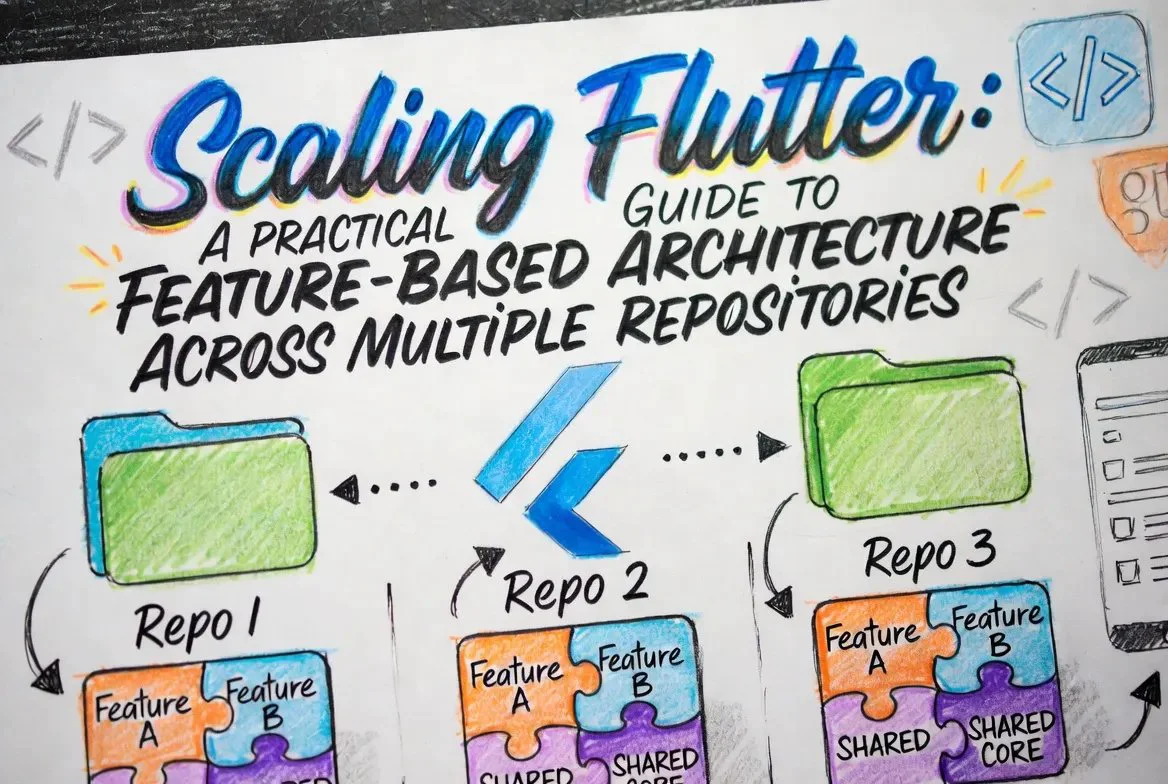
Why Multi-Repo?
Before tearing your codebase apart, it is important to understand the specific problems a multi-repo setup solves:
The Architecture Layout
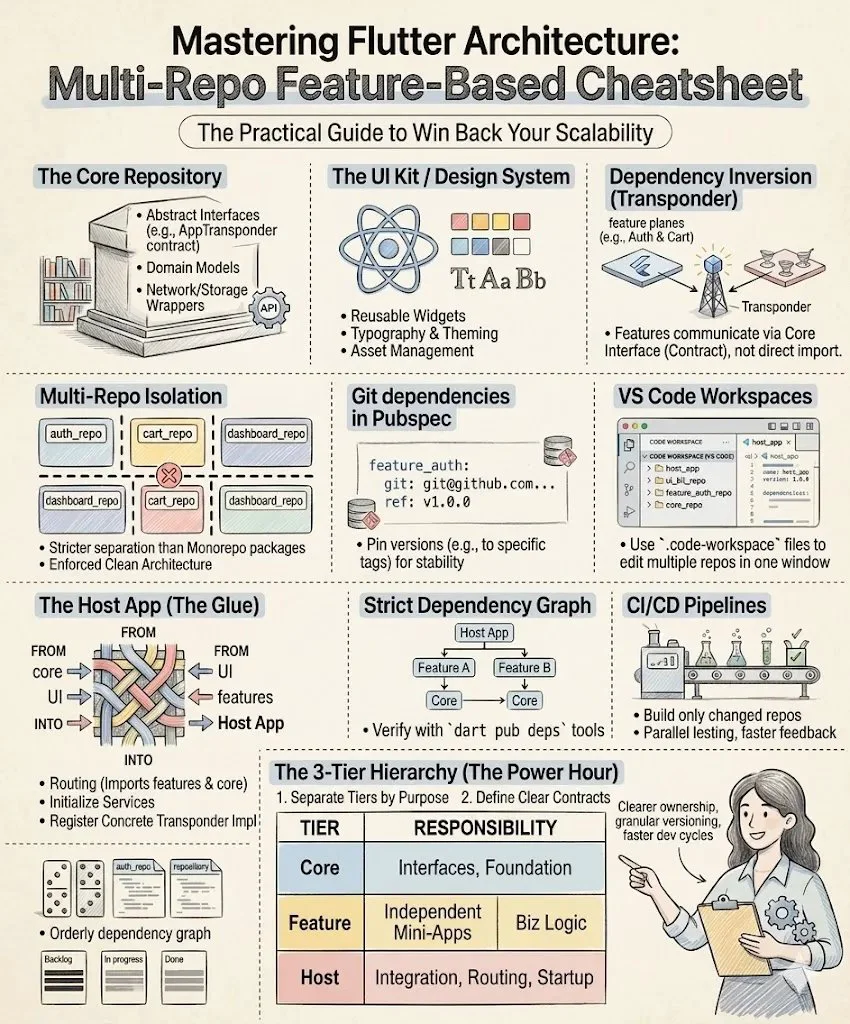
To make this work seamlessly, you need a clear hierarchy. A typical multi-repo Flutter architecture consists of three main tiers:
1. The Core & Shared Repositories (The Foundation)
These are the lowest-level repositories. They do not know your specific features and are heavily reused.
1.The Core & Shared Repositories (The Foundation)
/organization_root
│
├── core_domain/                # Business Logic & Interfaces (The "Brains")
│   ├── lib/
│   │   ├── src/
│   │   │   ├── transponder/
│   │   │   │   ├── app_transponder.dart  # Abstract interface definition
│   │   │   │   └── app_event.dart        # Base event classes
│   │   │   ├── models/                   # Global entities (e.g., User, Order)
│   │   │   └── failures/                 # Shared error/exception handling
│   │   └── core_domain.dart              # Main barrel file
│   └── pubspec.yaml
│
├── core_ui/                    # The Design System (The "Look")
│   ├── assets/                 # Shared fonts, icons, and logos
│   ├── lib/
│   │   ├── src/
│   │   │   ├── theme/
│   │   │   │   ├── app_colors.dart       # Brand color palette
│   │   │   │   └── app_typography.dart   # Text styles
│   │   │   └── widgets/                  # Atomic UI components
│   │   │       ├── custom_button.dart
│   │   │       └── loading_indicator.dart
│   │   └── core_ui.dart                  # Main barrel file
│   └── pubspec.yaml
│
└── core_infrastructure/        # Third-party & System Wrappers (The "Tools")
    ├── lib/
    │   ├── src/
    │   │   ├── network/
    │   │   │   ├── api_client.dart       # Dio or Http wrapper
    │   │   │   └── endpoints.dart        # Shared API constants
    │   │   ├── storage/
    │   │   │   └── local_storage.dart    # Shared preferences or Hive setup
    │   │   └── analytics/
    │   │       └── firebase_logger.dart  # Analytics wrapper
    │   └── core_infrastructure.dart
    └── pubspec.yaml
2. The Features Repositories (The Building Blocks)
These repositories contain the actual business logic and UI for a distinct domain of your app.
feature_auth, feature_dashboard, feature_settings).2.The Features Repositories (The Building Blocks)
/organization_root
│
├── feature_checkout/ # Business domain for payments & orders
│ ├── lib/
│ │ ├── src/
│ │ │ ├── data/ # Repositories & Data Sources (API calls)
│ │ │ ├── domain/ # Use Cases & Local Entities
│ │ │ └── presentation/ # UI, State Management & Controllers
│ │ │ ├── checkout_screen.dart
│ │ │ └── checkout_controller.dart <-- Broadcasts OrderPlacedEvent
│ │ └── feature_checkout.dart
│ ├── test/ # Isolated unit & widget tests
│ └── pubspec.yaml # Depends on core_domain, core_ui, core_infra
│
├── feature_dashboard/ # Business domain for overview & stats
│ ├── lib/
│ │ ├── src/
│ │ │ ├── domain/
│ │ │ └── presentation/
│ │ │ ├── dashboard_screen.dart
│ │ │ └── activity_badge.dart <-- Listens for OrderPlacedEvent
│ │ └── feature_dashboard.dart
│ ├── test/
│ └── pubspec.yaml # Depends on core_domain, core_ui
│
└── feature_auth/ # Business domain for login & registration
├── lib/
│ ├── src/
│ │ ├── domain/
│ │ └── presentation/
│ │ └── login_screen.dart
│ └── feature_auth.dart
├── test/
└── pubspec.yaml
3. The Host Application (The Glue)
This is your actual Flutter application. It is surprisingly lightweight. Its only job to.
3. The Host Application (The Glue)
/organization_root
│
└── host_app/                   # The main executable Flutter project
    ├── lib/
    │   ├── src/
    │   │   ├── di/             # The Wiring Room
    │   │   │   ├── injection.dart        # GetIt setup; Implements AppTransponder
    │   │   │   └── feature_modules.dart  # Inits individual feature dependencies
    │   │   │
    │   │   ├── routing/        # The Map
    │   │   │   ├── app_router.dart       # GoRouter/AutoRoute; Imports feature screens
    │   │   │   └── routes.dart           # Route name constants
    │   │   │
    │   │   ├── app.dart        # The Root Widget (MaterialApp, Theme setup)
    │   │   └── config/         # Environment flavors (dev, staging, prod)
    │   │
    │   └── main.dart           # Entry point: runs app and triggers DI
    │
    ├── assets/                 # App icons and splash screens
    ├── test_driver/            # Integration tests (testing the whole flow)
    └── pubspec.yaml            # The Master List (Depends on ALL Core & Features)
Implementation: Tying it Together
The most common hurdle in a multi-repo setup is managing the dependencies. Since these aren’t public packages on pub.dev, you have two main options:
1. Using Git Dependencies:
This is the most straightforward approach. In your Host App’s pubspec.yaml, you point directly to the Git repository of your feature:
dependencies:
  flutter:
    sdk: flutter
  core_ui:
    git:
      url: git@github.com:your-org/core_ui.git
      ref: main
  feature_auth:
    git:
      url: git@github.com:your-org/feature_auth.git
      ref: v1.2.0 # Always pin to a specific tag or commit for stability!
2. A Private Pub Server
For larger organizations, setting up a private package repository (using tools like Unpub or a cloud provider that supports Dart repositories) offers a more professional workflow, allowing you to use standard dart pub publish commands internally.
The “DI Transponder”: How Isolated Features Communicate
If feature_checkout cannot import feature_dashboard, what happens when a user successfully completes an order, and the dashboard needs to update a notification badge or refresh the user’s recent activity?
If you aren’t careful, you might be tempted to create a backdoor dependency, completely defeating the purpose of your multi-repo setup. The solution is to use a DI Transponder — a central communication hub injected into your features via Dependency injection.
Think of it as an air traffic control tower. The planes (features) don’t talk directly to each other; they broadcast their status to the tower, and the tower relays that information to anyone who needs to know.
1. The Contract (In the Core Repo)
In your shared core_infrastructure or core_domain repository, you define the interface for your transponder. This could be a stream-based event bus or a set of delegate callbacks.
// Inside core_domain repo
abstract class AppTransponder {
  Stream<AppEvent> get events;
  void broadcast(AppEvent event);
}
abstract class AppEvent {}
class UserLoggedOutEvent extends AppEvent {}
class OrderPlacedEvent extends AppEvent {
  final String orderId;
  OrderPlacedEvent(this.orderId);
}
2. The Broadcaster (In Feature Checkout)
Your features depend on the core_domain, so they have access to this interface. When a user finalizes their purchase, feature_checkout requests the AppTransponder from your DI container (like get_it) and broadcasts the event.
// Inside feature_checkout repo
class CheckoutController {
  final AppTransponder transponder;
  CheckoutController(this.transponder);
  Future<void> submitOrder(OrderData data) async {
    // ... logic to process payment and submit order
    final newOrderId = "ORD-12345";

    // Broadcast the success to the rest of the app
    transponder.broadcast(OrderPlacedEvent(newOrderId));
  }
}
Notice that feature_checkout has no idea who is listening. It just does its job and fires the flare.
3. The Listener (In Feature Dashboard)
Meanwhile, feature_dashboard needs to show a little red notification dot indicating a new activity update. It also requests the AppTransonder via DI and listens to the stream.
// Inside feature_dashboard repo
class DashboardActivityBadge extends StatelessWidget {
  final AppTransponder transponder = locator<AppTransponder>();
  @override
  Widget build(BuildContext context) {
    return StreamBuilder<AppEvent>(
      stream: transponder.events.where((e) => e is OrderPlacedEvent),
      builder: (context, snapshot) {
        if (snapshot.hasData) {
          // A new order was placed, show the notification dot!
          return const Icon(Icons.notifications_active, color: Colors.red);
        }
        return const Icon(Icons.notifications_none);
      }
    );
  }
}
4. The Implementation (In the Host App)
Finally, the actual implementation of the transponder lives in your lightweight Host App. During app initialization, the Host App registers the singleton and injects it into the features.
// Inside host_app repo
class DefaultAppTransponder implements AppTransponder {
  final _controller = StreamController<AppEvent>.broadcast();
  @override
  Stream<AppEvent> get events => _controller.stream;
  @override
  void broadcast(AppEvent event) => _controller.add(event);
}
// Initialization in main.dart or your DI setup file
locator.registerSingleton<AppTransponder>(DefaultAppTransponder());
By routing communication through a DI Transponder defined in the Core, your features remain completely agnostic of one another. You can compile, test, and develop feature_checkout in total isolation, mocking the transponder to simulate external events.
Developer Experience: Staying Sane Locally
Working across 5+ repositories can be a headache if you have to open separate IDE windows for each one.
To maintain a smooth workflow, leverage Multi-root Workspaces. In VS Code, you can create a .code-workspace file that gathers all your cloned repositories into a single integrated window. This allows you to search across the entire project ecosystem, run the host app, and edit the feature package simultaneously without context switching.
{
  "folders": [
    { "path": "../host_app" },
    { "path": "../core_ui" },
    { "path": "../core_infrastructure" },
    { "path": "../feature_auth" }
  ]
}
The Trade-offs
It’s not all sunshine and perfect code isolation. You need to be prepared for the downsides:
pubspec.yaml to point to the new version.Final Thoughts
A multi-repo feature-based architecture is a heavy-duty tool. It enforces discipline, prevents spaghetti code, and empowers multiple teams to move fast without stepping on each other’s toes. By combining strict isolation with smart communication patterns like the DI Transponder, you can keep your dependency graphs clean. If your app is scaling rapidly and your monolithic codebase is starting to feel brittle, it might be exactly what you need.
Loading…